
If we write 1 spider to analyze information for each website, it would be very time-consuming, especially with news websites where there are thousands of different news websites and new ones are created every day.
So now there’s a problem: we need to analyze the content of 1000 news websites, and our task is to schedule crawling these 1000 news websites daily. For scheduling, we can temporarily solve it with crontab, but what about crawling 1000 websites? We can’t write 1000 spiders to parse each website! So in this article, we’ll explore how to use a database to store configurations, specifically using MySQL in this article.
Some of you might wonder what analyzing content from 1000 news websites is for? This problem is mainly for trend analysis, keywords, daily hot events analysis, content analysis, showing which sites often repost content from other sites, which sites are reputable news sites to suggest to users, and many other things.
Create Project and Define Item
Create a Scrapy project and a Spider news like in the crawl-alonhadat article:
Create Crawl Alonhadat Project
Define the attributes needed for a news article. In this article, I’ll take 3 attributes: URL, title, content and time:
1
2
3
4
5
6
7
8
9
10
11
12
13
14
15
# Define here the models for your scraped items
#
# See documentation in:
# https://docs.scrapy.org/en/latest/topics/items.html

import scrapy


class CrawlerItem(scrapy.Item):
    # define the fields for your item here like:
    # name = scrapy.Field()
    url = scrapy.Field()
    title = scrapy.Field()
    content = scrapy.Field()
    date = scrapy.Field()
If you want to extract more like author, images, videos, list of related articles, etc., you can define additional fields to extract and write corresponding code in the Spider.
Database Design
Let’s take a representative website to analyze, here I’ll use kenh14. First, go to kenh14’s homepage:

We see that each news site has a homepage containing a list of articles. This list of articles can be a list of featured articles or a list of all articles sorted by newest, depending on each site. Therefore, taking articles from the homepage might not be enough articles and might be mixed since it’s a combination of many categories. So we’ll extract articles by category. Depending on the problem to solve, we can filter to get necessary data. For example, if you want to analyze daily trends, crawl articles from entertainment, world, lifestyle, media categories rather than necessarily crawling articles from law and vehicle categories. Website categories are represented as menu bars of each website.
Our project is scheduled to crawl daily, so unlike the Crawl Alonhadat project which might need to go through 4000 pages to get enough data for machine learning or deep learning models, for this type of project if it’s scheduled to run daily, we only need to get today’s latest articles or at most run 2-3 more days. In this project, for each category I only crawl articles in the first page found and schedule to crawl again hourly. Many people worry about duplicate articles, but this isn’t a big problem. We can take the article URL and HASH it to use as ID to update in the database (Postgres, Elasticsearch, etc.), so duplicate key articles will be updated rather than added as multiple records in the database. If crawling is missing articles, we need to consider reducing frequency from 1h to 30m, 20m or increasing the number of articles per crawl from 1 page to 2-3 pages.
I design the database for this project with 3 tables:
websitestable:

x_path_categoriestable:
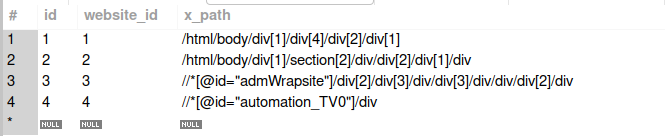
x_path_contentstable:

The case I consider in this project is the simplest case where the article list pages of categories for each website have the same structure and the detailed article pages of each website also only have 1 type.
For example, with vietnamnet site, the pages vietnamnet.vn/vn/thoi-su, vietnamnet.vn/vn/kinh-doanh, vietnamnet.vn/vn/giai-tri, vietnamnet.vn/vn/the-gioi all have the same website structure, so the x_path_categories table only needs to contain the website ID and save additional x_path of the outer wrapper tag of the article list.
The x_path_contents table is quite easy to understand. When accessing a detail page, it’s the x_path to extract each piece of information we need. Here I also consider a simple case where a website only has one type of article detail page.
Database Connection
Install the library to connect to the database for python:
1
pip3 install mysql-connector-python
Now that we have a database, we need to write additional code to connect to the database for the Scrapy project.
Create a constants.py file to store database information:
1
2
3
4
5
HOST = "localhost"
USER = "root"
PASSWORD = "mysql12345"
DATABASE = "x_news"
PORT = "3306"
The connector.py file will get corresponding information from the database:
1
2
3
4
5
6
7
8
9
10
11
12
13
14
15
16
17
18
19
20
21
22
23
24
25
26
27
28
29
30
31
32
33
34
35
36
37
38
39
40
41
42
43
44
import mysql.connector
from crawler.spiders import constants

db = mysql.connector.connect(
    host=constants.HOST,
    user=constants.USER,
    password=constants.PASSWORD,
    database=constants.DATABASE,
    port=constants.PORT
)
cursor = db.cursor()

# get all website in database
def get_all_websites():
    cursor.execute("select * from websites")
    rows = cursor.fetchall()

    result = []
    for row in rows:
        result.append(row)

    return result

# get all url categories of website
def get_categories(website_id):
    cursor.execute("select * from x_path_categories where website_id = " + str(website_id))
    rows = cursor.fetchall()

    result = []
    for row in rows:
        result.append(row[2])

    return result

# get x_path of title, content of url website
def get_contents(website_id):
    cursor.execute("select * from x_path_contents where website_id = " + str(website_id))
    rows = cursor.fetchall()

    result = []
    for row in rows:
        result.append({"title": row[2], "content": row[3], "date": row[4]})

    return result
Write Spider
If you regularly follow this series of mine, you’ll see that when I write Spider, I often use 3 functions: start_requests to prepare article list links, parse_links function to get the list of detailed article links from the article list page, and parse function to get necessary information from the detailed article page.
start_requests Function
1
2
3
4
5
6
7
8
9
def start_requests(self):
    list_websites = get_all_websites()
    for website in list_websites:
        domain = website[1] # get domain of website: https://vietnamnet.vn
        categories = json.loads(website[2]) # get list category of website: /thoi-su, /chinh-tri

        for category in categories:
            link = domain + category
            yield scrapy.Request(url=link, callback=self.parse_links, meta={"website_id": website[0], "domain": website[1]})
This function creates URLs for each category of websites from database data (you can see database data in the database design section above). These links are article list links. For example, the first record has domain = https://vietnamnet.vn and category = ["/vn/thoi-su/", "/vn/kinh-doanh/", "/vn/giai-tri/", "/vn/the-gioi/"], then it will go through each category and combine them into complete URLs https://vietnamnet.vn/vn/thoi-su/, https://vietnamnet.vn/vn/kinh-doanh/, https://vietnamnet.vn/vn/giai-tri/, https://vietnamnet.vn/vn/the-gioi/. These URLs are the article list URLs of each category, now send them down to the parse_link function for further work.
parse_link Function
1
2
3
4
5
6
7
8
9
10
11
12
13
14
def parse_links(self, response):
    result = set()

    x_path_categories = get_categories(response.meta.get("website_id"))
    for x_path_category in x_path_categories:
        x_path = x_path_category + "//a/@href" # get all tag a, after get all attribute href contain link of post in website news
        list_href = response.xpath(x_path).extract()

        for href in list_href:
            if len(href) > 50 and ("http" not in href): # link have less than 50 character maybe not is link of post
                result.add(response.meta.get("domain") + href)

    for item in result:
        yield scrapy.Request(url=item, callback=self.parse, meta={"website_id": response.meta.get("website_id")})
In the start_request function, we sent an additional parameter "website_id": website[0] down. website_id helps us find the x_path of the element wrapping the outside of the article list through the x_path_categories table. Use the get_categories function written in the database connection section to get the corresponding x_path, extract the URL list of each article and call the final parse function.
Note that we still need to send website_id down to the parse function to be able to get the x_path information in articles defined in the database at the x_path_contents table.
parse Function
1
2
3
4
5
6
7
8
9
10
11
12
13
14
15
16
17
18
def parse(self, response):
    posts = get_contents(response.meta.get("website_id"))
    for post in posts:
        content = response.xpath(post["content"] + "").extract_first()
        title = response.xpath(post["title"] + "//text()").extract_first()
        date = response.xpath(post["date"] + "//text()").extract_first()

        content = self.normalize(content)
        title = self.normalize(title)
        date = self.normalize(date)

        crawlerItem = CrawlerItem()
        crawlerItem['content'] = content
        crawlerItem['title'] = title
        crawlerItem['date'] = date
        crawlerItem['url'] = response.url

        yield crawlerItem
This function is quite clear with its purpose. With each corresponding x_path in the database, extract corresponding data and return CrawlerItem.
Run and Schedule Project
This article is in the Crawl series so I mainly talk about crawling and storage methods for crawling rather than its data flow.
You can follow the complete project with data flow from crawl scheduling -> queue -> Spark Streaming -> Spark ML at https://github.com/trannguyenhan/X-news (This source code is also quite old, some things related to Kibana, ElastichSearch are not updated to the repo, so use it for reference only)
Run the project with the command:
1
scrapy crawl news
For this project I’m writing a pipeline file with output data pushed to a Kafka queue for another side to receive and process data later. The pipelines.py file is written as below:
1
2
3
4
5
6
7
8
9
10
11
12
13
14
15
16
17
18
19
20
21
# Define your item pipelines here
#
# Don't forget to add your pipeline to the ITEM_PIPELINES setting
# See: https://docs.scrapy.org/en/latest/topics/item-pipeline.html

# useful for handling different item types with a single interface
from itemadapter import ItemAdapter
from kafka import KafkaProducer
import json

class CrawlerPipeline:
    def open_spider(self, spider):
        self.producer = KafkaProducer(bootstrap_servers=['localhost:9092'], \
            value_serializer=lambda x: json.dumps(x, ensure_ascii=False).encode('utf-8'))
        self.topic = "x_news_1"

    def process_item(self, item, spider):
        line = ItemAdapter(item).asdict()
        self.producer.send(self.topic, value=line)
        return item
You can reference the complete Crawler project at this GITHUB link: https://github.com/demanejar/crawler-1000news.
To schedule the Spider to run daily, you can use crontab, which works quite simply - copy the run command into the file it scans through. Learn more about cron at https://viblo.asia/p/task-schedule-trong-laravel-naQZRkOqlvx#_crontab-0.
Since the website doesn’t have a comment section under the article, please discuss and give me feedback at this GITHUB DISCUSSION: https://github.com/orgs/demanejar/discussions/1.