
Every time we write a spider, we have to write many CSS selector and xpath segments to analyze information, and often we don’t know if they’re correct or not. Each time like this, we have to run the project and then print out the information we crawled to see if it’s correct or not. Doing this is very time-consuming, so Scrapy provides a very useful tool to check beforehand whether the CSS selector or xpath we write is correct or not.
Launch Shell
1
scrapy shell <url>
Where url is the URL of the website we want to check.
For example, I want to check a news page from kenh14:
1
scrapy shell https://kenh14.vn/thi-vao-lop-10-tai-ha-noi-chinh-thuc-bat-dau-20230610083632015.chn
Using Shell
When entering the shell, there’s a response variable declared and ready to use, just like the response variables in the Spider we usually write.
I’ll check the website URL:
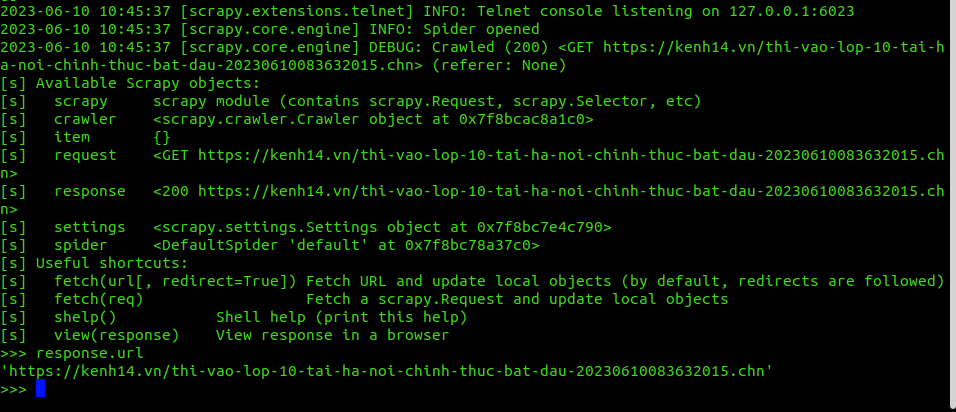
Similarly when getting the title of that website:
1
2
3
>>> response.css("h1::text").extract_first()
'\r\n                                    Thi vào lớp 10 tại Hà Nội chính thức bắt đầu'
>>>
Right in this shell, if we want to switch to another URL without having to exit the shell, we should use the fetch command:
1
2
3
4
5
6
7
>>> fetch("http://www.google.com", True)
2023-06-10 10:55:17 [filelock] DEBUG: Attempting to acquire lock 140238303771136 on /home/trannguyenhan/.cache/python-tldextract/3.8.10.final__usr__7d8fdf__tldextract-3.4.0/publicsuffix.org-tlds/de84b5ca2167d4c83e38fb162f2e8738.tldextract.json.lock
2023-06-10 10:55:17 [filelock] DEBUG: Lock 140238303771136 acquired on /home/trannguyenhan/.cache/python-tldextract/3.8.10.final__usr__7d8fdf__tldextract-3.4.0/publicsuffix.org-tlds/de84b5ca2167d4c83e38fb162f2e8738.tldextract.json.lock
2023-06-10 10:55:17 [filelock] DEBUG: Attempting to release lock 140238303771136 on /home/trannguyenhan/.cache/python-tldextract/3.8.10.final__usr__7d8fdf__tldextract-3.4.0/publicsuffix.org-tlds/de84b5ca2167d4c83e38fb162f2e8738.tldextract.json.lock
2023-06-10 10:55:17 [filelock] DEBUG: Lock 140238303771136 released on /home/trannguyenhan/.cache/python-tldextract/3.8.10.final__usr__7d8fdf__tldextract-3.4.0/publicsuffix.org-tlds/de84b5ca2167d4c83e38fb162f2e8738.tldextract.json.lock
2023-06-10 10:55:17 [scrapy.core.engine] DEBUG: Crawled (200) <GET http://www.google.com> (referer: None)
>>>
Scrapy shell can also be used with local files by replacing the URL position with the path to the corresponding file:
1
scrapy shell ./path/to/file.html
Scrapy Shell is an effective debugging tool. There are some more features that Scrapy Shell provides, but in this article or this series, I only want to mention things that are really useful and that I often use. There’s a lot of knowledge, so we should filter out the things we use frequently, regularly use to avoid being overloaded. For the remaining things, knowing how to search or where to look them up is enough.
Learn more about Scrapy shell at: https://docs.scrapy.org/en/latest/topics/shell.html.