
During the process of working on a major project for the Data Storage and Big Data Processing course at university, I learned about Kafka and used it in my project. However, at that time I only simply knew it was a message queue for data ingestion that helps read and write operations from source to destination to be loosely coupled. So I decided to research the concepts and how it works in more detail and write about it here.
Apache Kafka is a system created by LinkedIn to serve stream processing, later open-sourced. Initially it was seen as a message queue but later developed into a distributed streaming platform (many technical terms are difficult to translate into Vietnamese!!).
Problems in Big Data
The 3Vs in big data: data with large volume generated every second in different formats (structured, semi-structured, unstructured). To handle the above problems, we need to aggregate data from various sources like HDFS, NoSQL DB, RDBMS, etc. However, how can we process simultaneously and not be dependent on each other (loosely coupled) with those data sources -> Kafka is a solution.
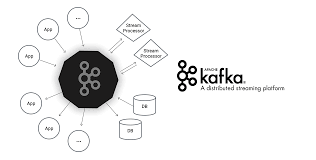
Some Components in Kafka
Overview
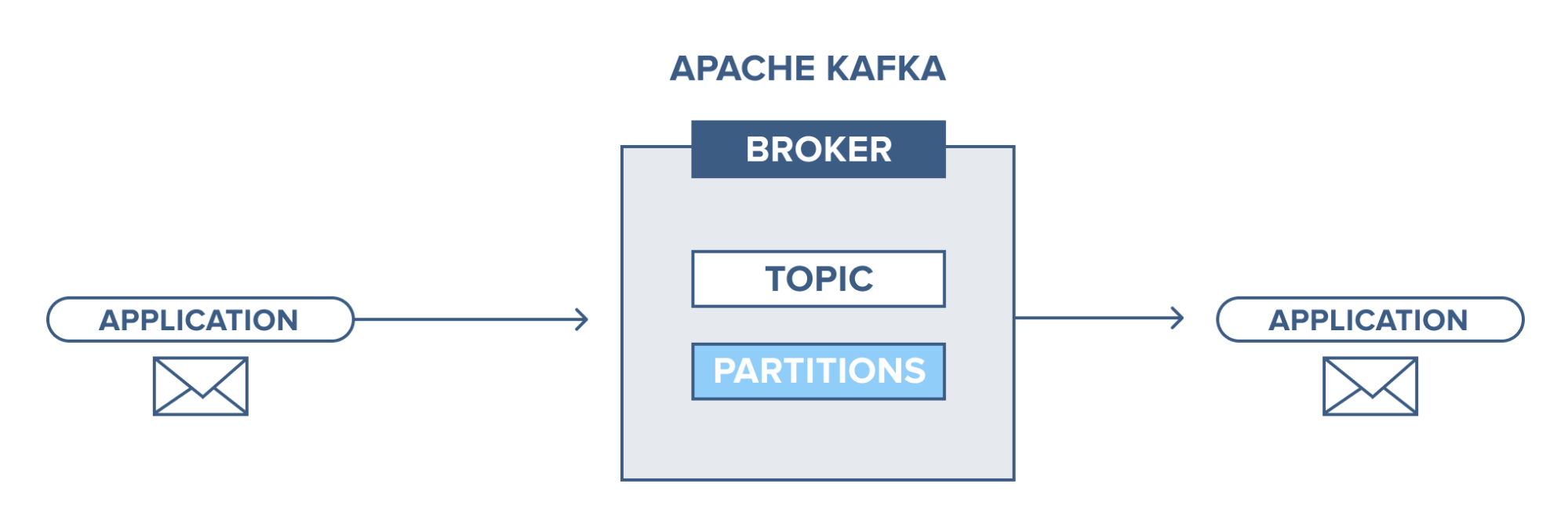
An application connects to this Kafka system and sends messages (records) to a topic. Messages can be anything, for example system logs, events, etc. Then another application connects and retrieves messages (records) from the topic. Data is still stored on disk until the predefined retention time expires.
Broker
Here we refer to the Kafka cluster, where we have servers running Kafka. This contains topics that producers send data to and consumers will retrieve data from.
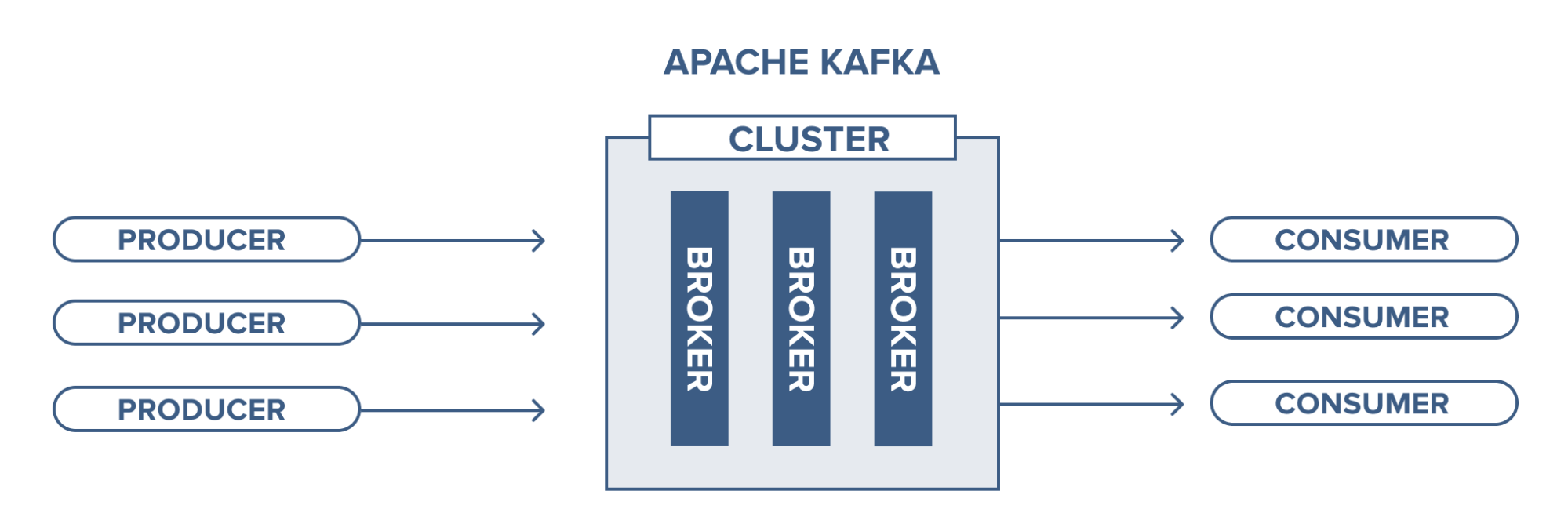
Management of brokers is handled by Zookeeper. A Kafka cluster can also have more than 1 Zookeeper.
Topic
A topic is where data records are stored and used.
Records added to a topic have an “offset” which is their position index to help consumers identify and retrieve them. Consumers can adjust this position to retrieve in the desired order, for example when we want to process from the beginning, we can set the earliest offset.
Topic partition
As mentioned earlier, each record has its own offset and in topics we have the concept of partitions, meaning sharding. A topic can have multiple partitions and records will be stored in those partitions with offset values. This helps consumers read data from topics in parallel, for example if a topic has 4 partitions and we have 1 consumer, this consumer will read from all 4 partitions of that topic.
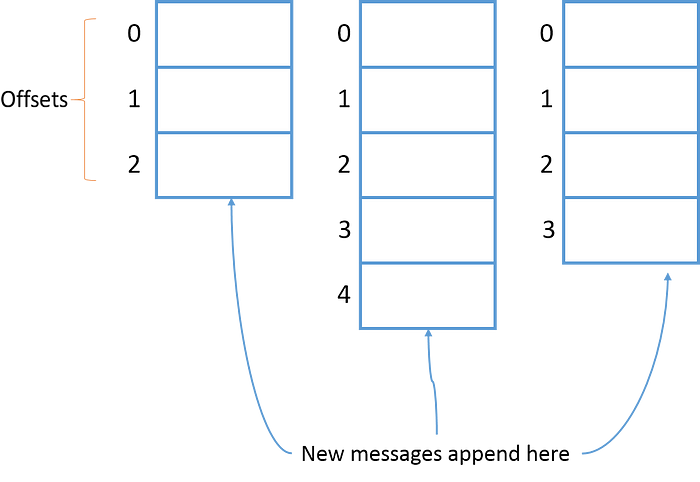
Topic partitions can reside on different brokers, so this allows topics to be accessible from multiple brokers.
Topic data backup is when we set the replication-factor when creating a topic. For example, when we create a topic with 3 partitions and replication-factor of 3, we get the result as shown below. This ensures availability.
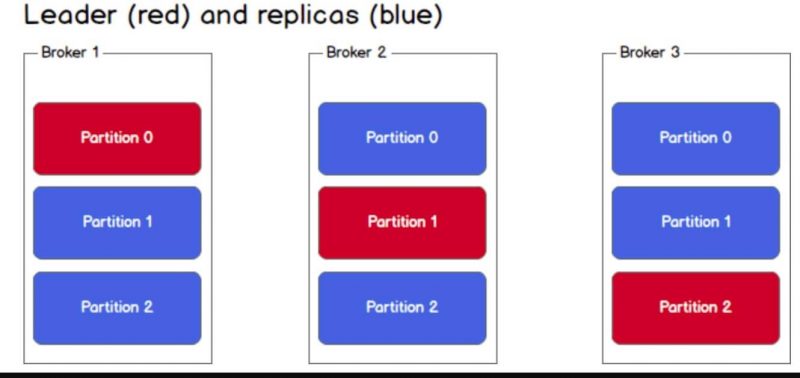
The mechanism here is Leader - Follower (partitions). When data is pushed to the leader, it is responsible for read and write operations. Followers only play a replication role, we cannot read from them because Kafka doesn’t allow it. When the leader crashes, a new leader will be elected from the followers and data will be synchronized.
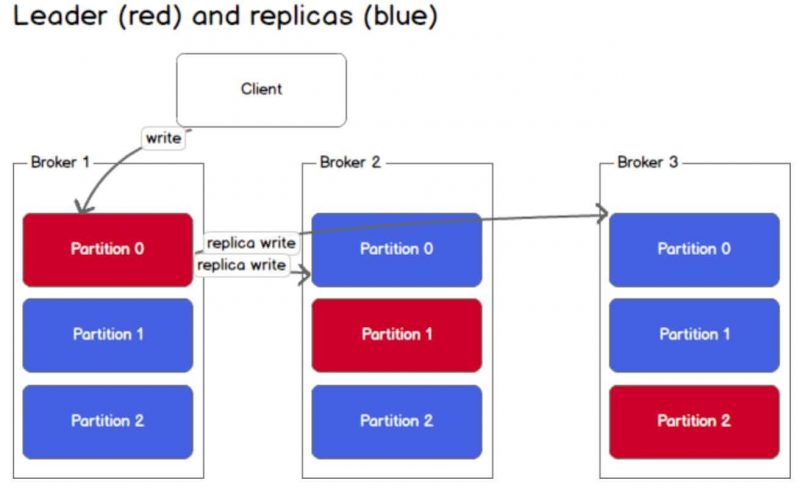
Leader - Follower storage information is stored in metadata managed by Zookeeper.
Producer
A producer’s job is to send data to topics in brokers.
How does a producer write a message?
In a Kafka cluster, producers only write data to the leader partition of a topic. For a specific topic, we don’t talk about leader - follower here. If there’s new data coming in and the topic the producer sends to has more than 1 partition, only 1 partition will receive that data.
3 ways a producer can write to a topic:
send(key,value,topic,partition): explicitly specify the partition the message is written tosend(key,value,topic): A hash function will calculate the key value to put into the appropriate partitionsend(key,value): Data is put into partitions using round-robin mechanism
Consumer
Consumers retrieve data from topics in brokers that they subscribe to.
Consumers can read any offset in a topic, so they can join the cluster at any time.
How does a consumer retrieve messages?
Like producers, consumers must first find metadata and read data from leader-partitions. If the data is large, consumers may lag -> to solve this: Consumer Groups.
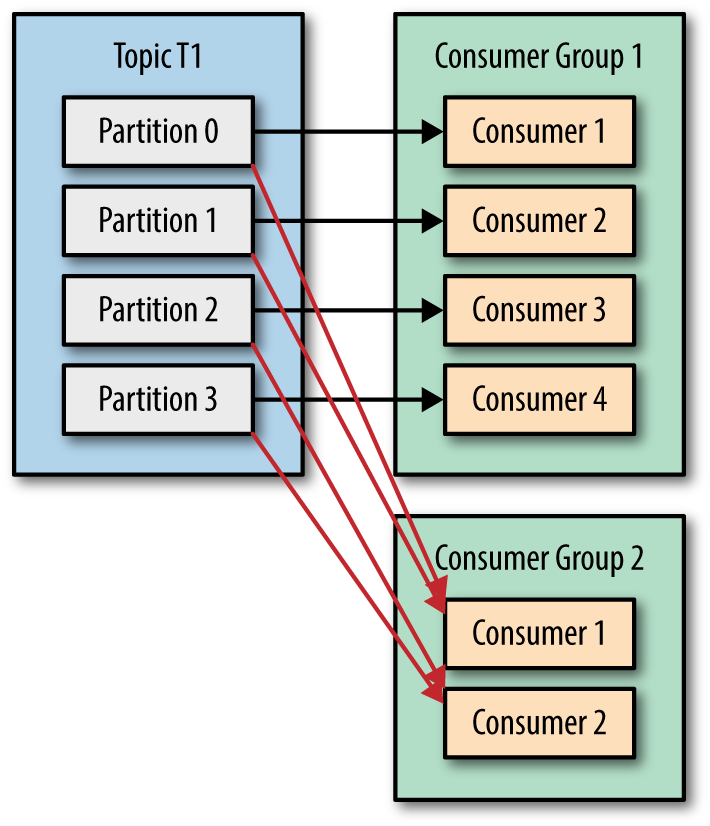
A consumer group is a group of consumers with the same ID. Each consumer is assigned to only 1 partition. If the number of partitions is greater than the number of consumers, a consumer can receive multiple partitions. If smaller, some consumers won’t receive data. Partition assignment to consumers is handled by the Group Coordinator - one of the brokers in the cluster.
Data Storage in Kafka
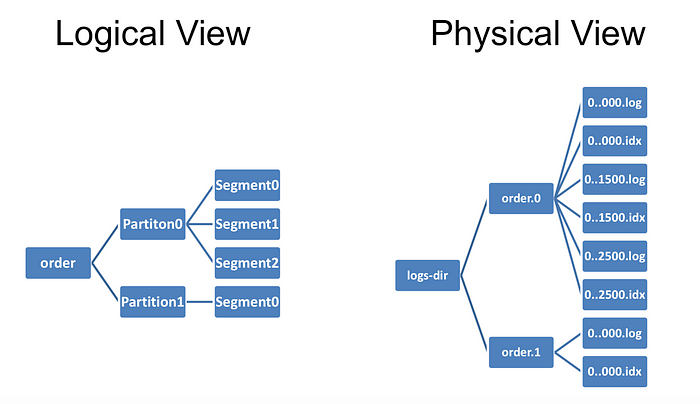
All data is stored on disk, not in RAM, and arranged sequentially in a data structure called a log. This still allows Kafka to be fast for several reasons below:
- Messages are grouped together to form a segment -> reduces network resource usage costs, consumers find a segment -> reduces disk load
- Data is stored in binary format making it optimal for zero-copy capability
- Data at the producer is already compressed using compression algorithms like gzip and then decompressed at the consumer
- Reading/writing on log data structure is O(1) (No random disk access)
Use Cases
For e-commerce websites, every click or user action on the site can reflect their shopping habits. This data will be fed into Kafka for real-time processing to provide suggestions immediately while they’re on the website. Then stream processing will aggregate this with new data to provide suggestions for the next visit. Using Kafka won’t affect the system database, ensuring stability.
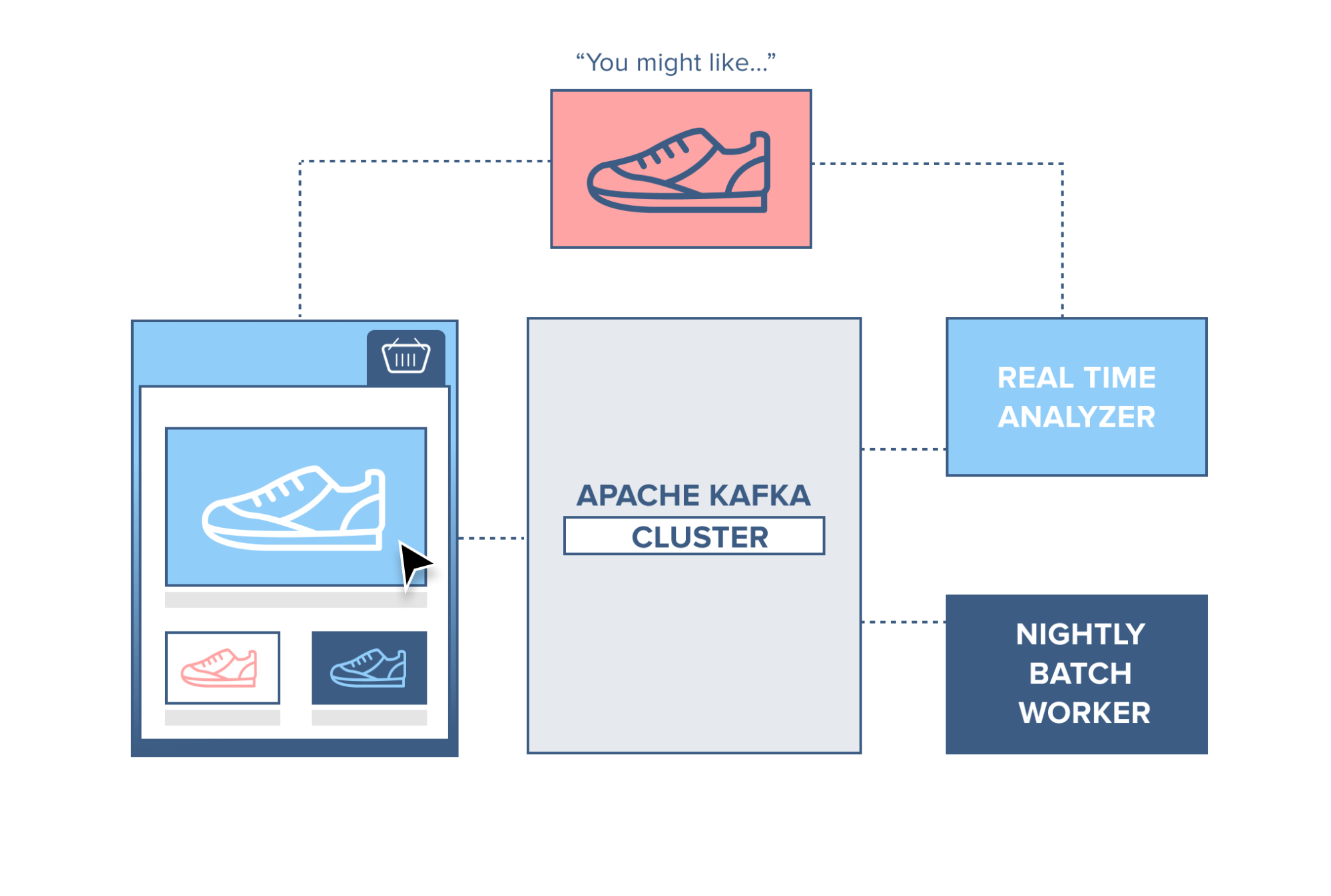
There are many more applications, but I don’t want to focus on this part. Everyone can research more.
Installing and Using Kafka
Installing Zookeeper
For quick deployment and ease of use, I’ll use Docker. First, we’ll create a kafka folder and create a docker-compose file in it.
1
2
mkdir kafka
cd kafka
First, we need Zookeeper. In the docker-compose file, I’ll configure as follows:
1
2
3
4
5
6
7
8
9
10
11
12
13
services:
  zookeeper:
    image: zookeeper:3.4.9
    hostname: zookeeper
    ports:
      - "2181:2181"
    environment:
      ZOO_MY_ID: 1
      ZOO_PORT: 2181
      ZOO_SERVERS: server.1=zookeeper:2888:3888
    volumes:
      - ./data/zookeeper/data:/data
      - ./data/zookeeper/datalog:/datalog
After completion, run docker-compose up. The zookeeper container will be downloaded and we can run zookeeper on port 2181 as configured.
Installing Kafka standalone
I’ll temporarily stop the docker process running zookeeper and proceed to edit the docker-compose file with the following content:
1
2
3
4
5
6
7
8
9
10
11
12
13
14
15
16
kafka1:
    image: confluentinc/cp-kafka:5.3.0
    hostname: kafka1
    ports:
      - "9091:9091"
    environment:
      KAFKA_ADVERTISED_LISTENERS: LISTENER_DOCKER_INTERNAL://kafka1:19091,LISTENER_DOCKER_EXTERNAL://${DOCKER_HOST_IP:-127.0.0.1}:9091
      KAFKA_LISTENER_SECURITY_PROTOCOL_MAP: LISTENER_DOCKER_INTERNAL:PLAINTEXT,LISTENER_DOCKER_EXTERNAL:PLAINTEXT
      KAFKA_INTER_BROKER_LISTENER_NAME: LISTENER_DOCKER_INTERNAL
      KAFKA_ZOOKEEPER_CONNECT: "zookeeper:2181"
      KAFKA_BROKER_ID: 1
      KAFKA_OFFSETS_TOPIC_REPLICATION_FACTOR: 1
    volumes:
      - ./data/kafka1/data:/var/lib/kafka/data
    depends_on:
      - zookeeper
After editing, try running docker-compose up. I’ll try creating a topic immediately with the command:
1
2
docker exec -it kafka_kafka1_1 kafka-topics --zookeeper zookeeper:2181 --create --topic my-topic --partitions 1 --replication-factor 1
Setting up Kafka with multiple brokers
To run a Kafka cluster, I need to add other brokers. Here I’ll add 2 more brokers by continuing to edit the docker-compose file.
Add the second broker with ID 2 on port 9089:
1
2
3
4
5
6
7
8
9
10
11
12
13
14
15
kafka2:
    image: confluentinc/cp-kafka:5.3.0
    hostname: kafka2
    ports:
      - "9089:9089"
    environment:
      KAFKA_ADVERTISED_LISTENERS: LISTENER_DOCKER_INTERNAL://kafka2:19092,LISTENER_DOCKER_EXTERNAL://${DOCKER_HOST_IP:-127.0.0.1}:9092
      KAFKA_LISTENER_SECURITY_PROTOCOL_MAP: LISTENER_DOCKER_INTERNAL:PLAINTEXT,LISTENER_DOCKER_EXTERNAL:PLAINTEXT
      KAFKA_INTER_BROKER_LISTENER_NAME: LISTENER_DOCKER_INTERNAL
      KAFKA_ZOOKEEPER_CONNECT: zookeeper:2181
      KAFKA_BROKER_ID: 2
    volumes:
      - ./data/kafka2/data:/var/lib/kafka/data
    depends_on:
      - zookeeper
Similarly with the third broker on port 9090:
1
2
3
4
5
6
7
8
9
10
11
12
13
14
15
16
  kafka3:
    image: confluentinc/cp-kafka:5.3.0
    hostname: kafka3
    ports:
      - "9090:9090"
    environment:
      KAFKA_ADVERTISED_LISTENERS: LISTENER_DOCKER_INTERNAL://kafka3:19093,LISTENER_DOCKER_EXTERNAL://${DOCKER_HOST_IP:-127.0.0.1}:9093
      KAFKA_LISTENER_SECURITY_PROTOCOL_MAP: LISTENER_DOCKER_INTERNAL:PLAINTEXT,LISTENER_DOCKER_EXTERNAL:PLAINTEXT
      KAFKA_INTER_BROKER_LISTENER_NAME: LISTENER_DOCKER_INTERNAL
      KAFKA_ZOOKEEPER_CONNECT: "zookeeper:2181"
      KAFKA_BROKER_ID: 3
      KAFKA_OFFSETS_TOPIC_REPLICATION_FACTOR: 1
    volumes:
      - ./data/kafka3/data:/var/lib/kafka/data
    depends_on:
      - zookeeper
Now I’ll test if the cluster works by creating a new topic with replication-factor = 3 (to see if the topic is distributed across all 3 brokers):
1
2
docker exec -it kafka_kafka1_1 kafka-topics --zookeeper zookeeper:2181 --create --topic my-topic-three --partitions 1 --replication-factor 3
References
A simple apache kafka cluster with docker kafdrop