
Proxy is probably a concept that is no longer strange to everyone. For people working on data crawling, proxy is like an inseparable companion. In this article, I will guide you on how to configure proxy for Scrapy projects. The project I use as an example for this article is the alonhadat crawling project https://github.com/demanejar/crawl-alonhadat.
With each of my articles like this one “Configure Proxy for Scrapy Project”, I don’t just want to talk about how to configure proxy in the project, I want to talk more broadly about related issues. If you’re only interested in the main point of how to configure proxy for Scrapy projects, you can skip this introductory part and scroll down to the later part of the article.
Proxy and Websites That Block Bots Based on Abnormal Traffic
In the previous article, we analyzed the website and wrote a program to collect data. However, that’s not enough. Now alonhadat has implemented IP bans for IPs that have high traffic within a certain time period. Most obviously, just running the project for about 4-5 minutes (or even less, 2-3 minutes) will generate a bunch of exceptions and after accessing the alonhadat website again, you’ll get this result:
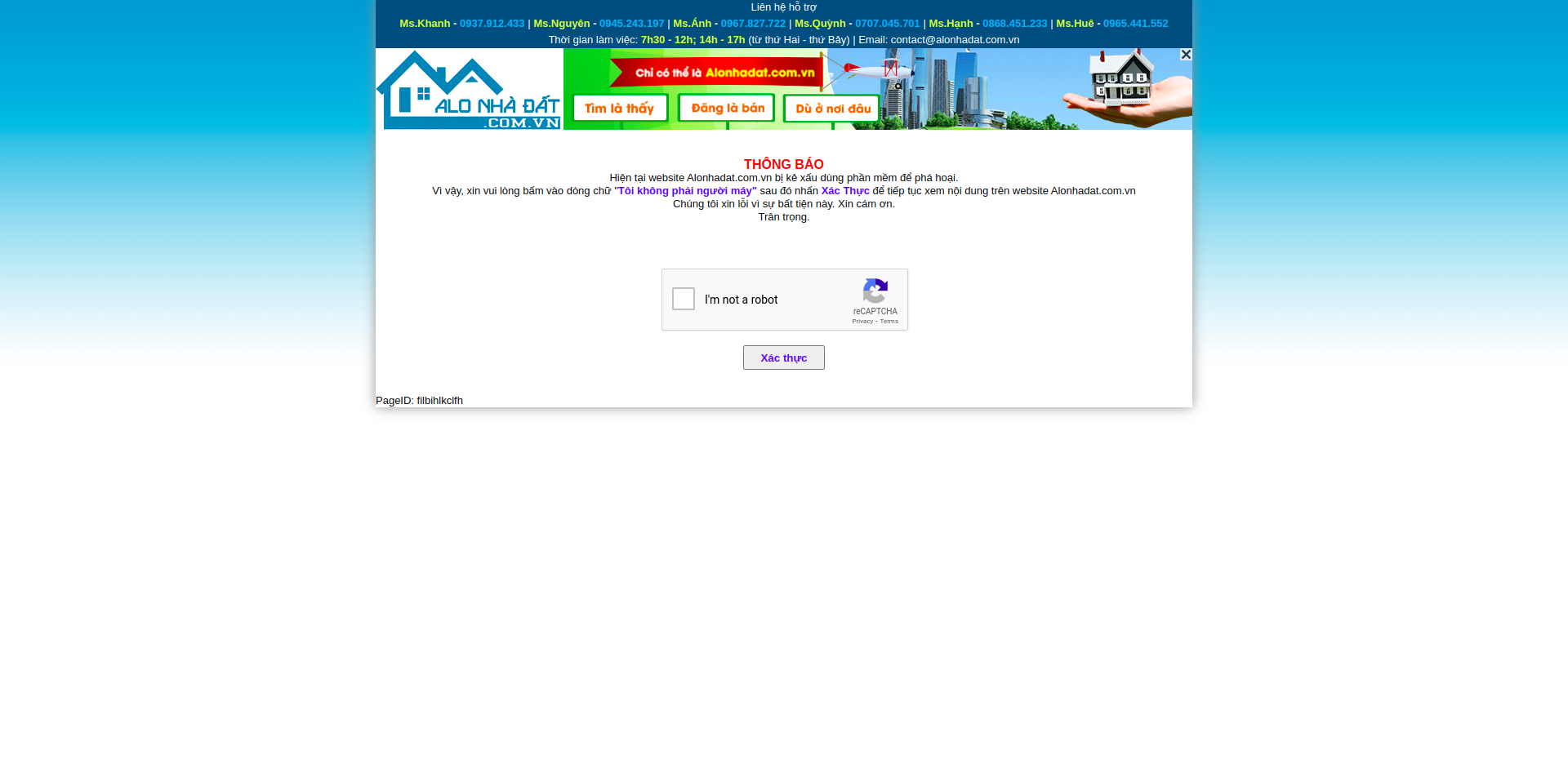
With this image, we can temporarily assume that alonhadat is blocking bots by IP, because besides bots being caught to solve captcha, real users visiting the website are also being forced to solve captcha. This is one of the simplest ways to protect websites from crawling bots - whenever they see an IP with abnormal traffic, they ban it immediately. After 1-2 days or 1-2 months, they lift the ban, then ban again when there’s abnormal activity.
With websites using this banning method, there are basically 2 ways to avoid it:
1 is to use proxy, really many proxies. It depends on how the website blocks. If the website’s blocking threshold is small (threshold here I mean the number of website visits in a certain time), then we’ll need really many proxies. If this threshold is higher, we might need fewer proxies. How many proxies are enough needs to be tested through experimentation. For example, when I crawled the website https://www.yelp.com/, I used a pool of 10 proxies, with each request 2s apart and each request would randomly pick 1 proxy to access the website. After 2-3 hours, all 10 proxies were banned. So I decided to increase to 100, this time it lasted longer - after one night all 100 proxies were also banned. The problem is now needing even more proxies. What about 1000? And that’s just speculation because 1000 proxies cost too much money, so I decided to stop.
2 is more difficult - writing a script to bypass captcha. This method can’t always be used because some websites block completely instead of forcing users to solve captcha to continue viewing content, typically like https://www.yelp.com/ and this website naturally has a larger blocking threshold. Since these captchas change to other types very easily, the script you write can only be used for quite a short time, and nowadays there are many very complex types of captcha, being able to bypass these new types of captcha is generally difficult.
This banning method also brings quite a bad experience for users. When I’m crawling, alonhadat is banning my IP and I have to solve captcha to access the website, but my roommates using the same wifi and sharing the same IP are also forced to solve captcha even though they’re not doing anything. So it’s possible that the website is using this method temporarily while they research for a better solution.
Data Flow and Scrapy Architecture
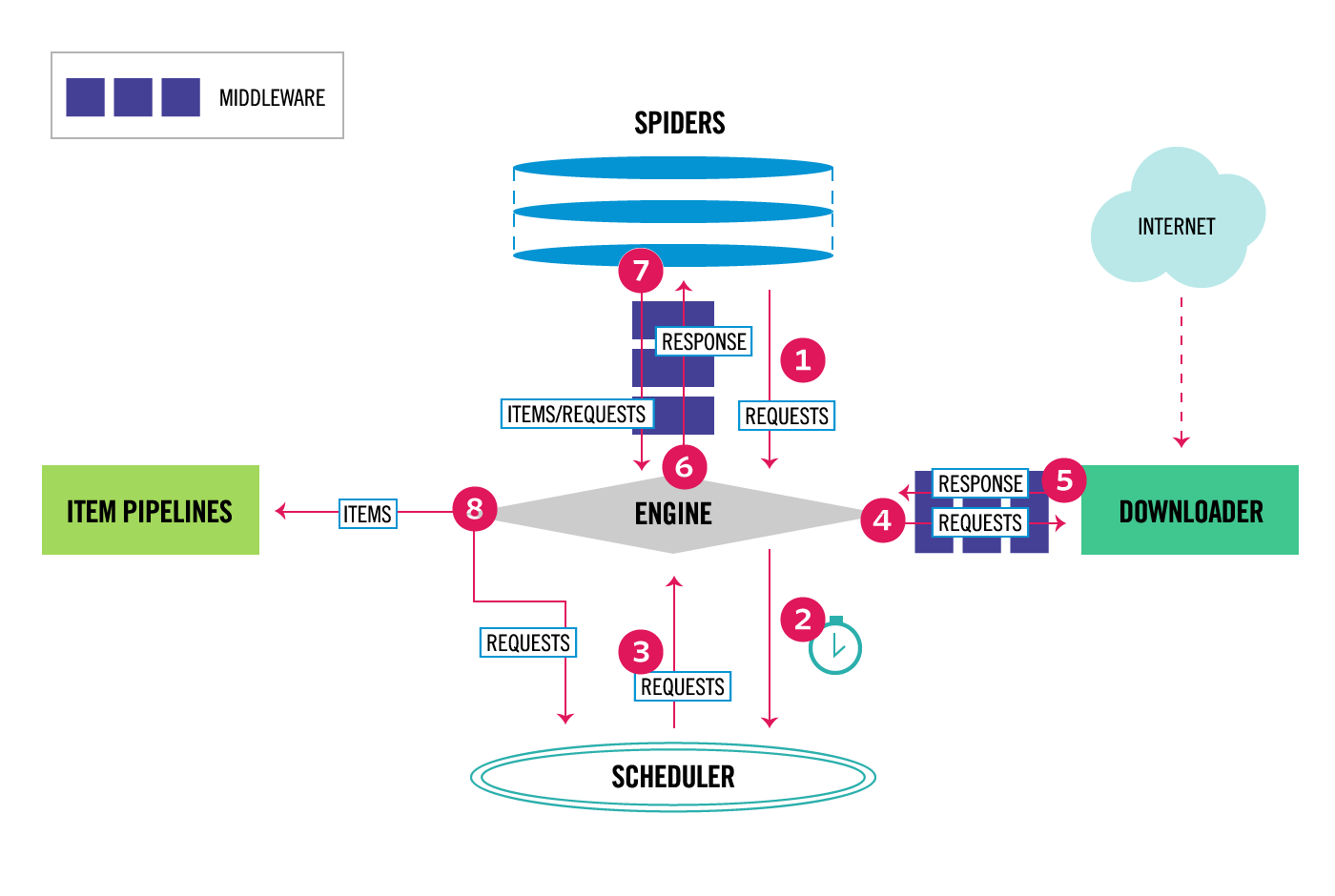
Scrapy consists of 6 components:
Scrapy Engine: responsible for controlling data flow movement between components in the system, triggering some events under certain conditions
Downloader: finds and downloads HTML code segments from the specified website
Spiders: where we mainly work, where we write code segments to analyze websites
Item Pipeline: responsible for processing Items extracted and created by Spiders
Middleware: there will be 2 types of middleware. 1 is middleware between Spiders and Engine, this middleware is usually used less because code written in Spider Middleware can also be replaced by writing in Spiders or Item Pipeline. 2 is Downloader Middleware between Downloader and Engine, it aims to process requests before they are sent to Downloader, most typically adding proxy to requests
Through understanding each component and the function of each component, everyone should have visualized that we will configure proxy for each request in Downloader Middleware.
Configure Proxy for Scrapy Project
If you don’t know which website to use proxy from, you can reference the website https://proxy.webshare.io/. Proxies on this website are cheap and quite good quality, each account also has 10 free proxies for testing.
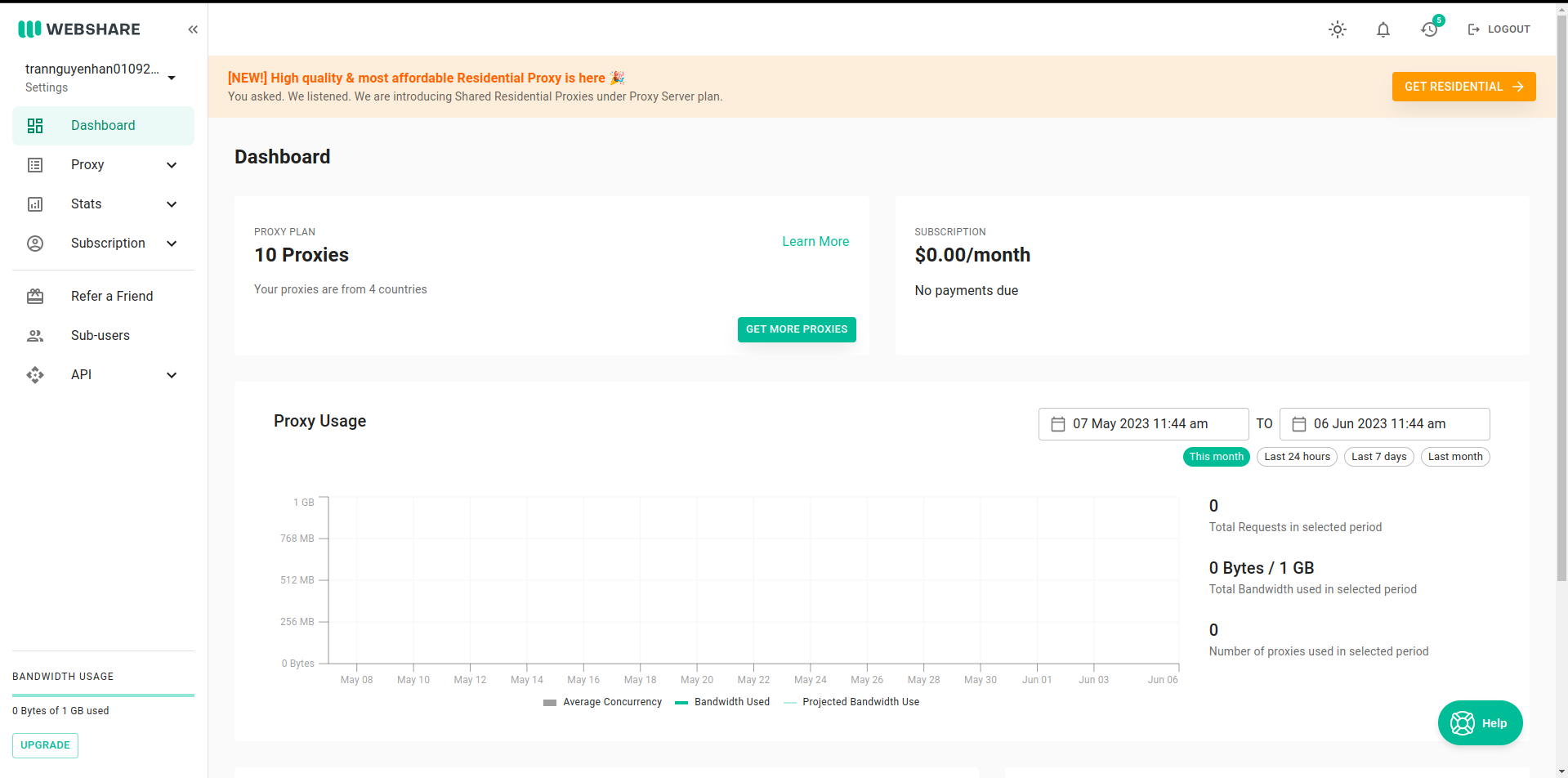
Go to Proxy -> List -> Download to download the proxy list, rename the downloaded file to proxies.txt and copy them to the project folder.
In the middlewares.py file is where the code for Spider Middleware and Downloader Middleware is contained. The file has 2 classes and methods that are clearly defined and commented on how to use them.
To add proxy to requests before they are sent to Downloader, we will write in the process_request function of the DataPriceDownloaderMiddleware class:
1
2
3
4
5
6
7
8
9
10
11
12
13
14
15
16
17
18
19
20
21
22
23
24
25
26
27
28
29
30
31
32
33
34
35
36
37
38
39
40
41
42
43
44
45
46
47
48
49
50
51
52
53
54
55
56
57
58
59
60
from w3lib.http import basic_auth_header
import random

proxyPools = open("data_price/proxies.txt", "r").read().split("\n")

class DataPriceDownloaderMiddleware(object):
    # Not all methods need to be defined. If a method is not defined,
    # scrapy acts as if the downloader middleware does not modify the
    # passed objects.

    @classmethod
    def from_crawler(cls, crawler):
        # This method is used by Scrapy to create your spiders.
        s = cls()
        crawler.signals.connect(s.spider_opened, signal=signals.spider_opened)
        return s

    def process_request(self, request, spider):
        # Called for each request that goes through the downloader
        # middleware.

        # Must either:
        # - return None: continue processing this request
        # - or return a Response object
        # - or return a Request object
        # - or raise IgnoreRequest: process_exception() methods of
        #   installed downloader middleware will be called
        return None

    def process_response(self, request, response, spider):
        # Called with the response returned from the downloader.

        # Must either;
        # - return a Response object
        # - return a Request object
        # - or raise IgnoreRequest

        proxy = random.choice(proxyPools).split(":")
        httpsProxy = proxy[0]
        portProxy = proxy[1]
        usernameProxy = proxy[2]
        passwordProxy = proxy[3]

        request.meta['proxy'] = "http://" + httpsProxy + ":" + portProxy
        request.headers['Proxy-Authorization'] = basic_auth_header(usernameProxy, passwordProxy)

        return response

    def process_exception(self, request, exception, spider):
        # Called when a download handler or a process_request()
        # (from other downloader middleware) raises an exception.

        # Must either:
        # - return None: continue processing this exception
        # - return a Response object: stops process_exception() chain
        # - return a Request object: stops process_exception() chain
        pass

    def spider_opened(self, spider):
        spider.logger.info('Spider opened: %s' % spider.name)
We define beforehand a
proxyPoolsthat reads from theproxies.txtfile just added to the projectIn
process_requestwe will randomly pick any proxy and add them to headers
Now go to the settings.py file, find the DOWNLOADER_MIDDLEWARES position and uncomment it, then add another HttpProxyMiddleware so these Middlewares are called when crawling starts:
1
2
3
4
DOWNLOADER_MIDDLEWARES = {
    'scrapy.downloadermiddlewares.httpproxy.HttpProxyMiddleware': 600,
    'data_price.middlewares.DataPriceDownloaderMiddleware': 543,
}
Make the number for HttpProxyMiddleware larger than DataPriceDownloaderMiddleware so it gets called later. The numbers 543 and 600 are priority levels so the system knows which one to call first.
Now when we run the project again, we’ll see results being returned sequentially and previously there were many exceptions thrown due to elements not being found:
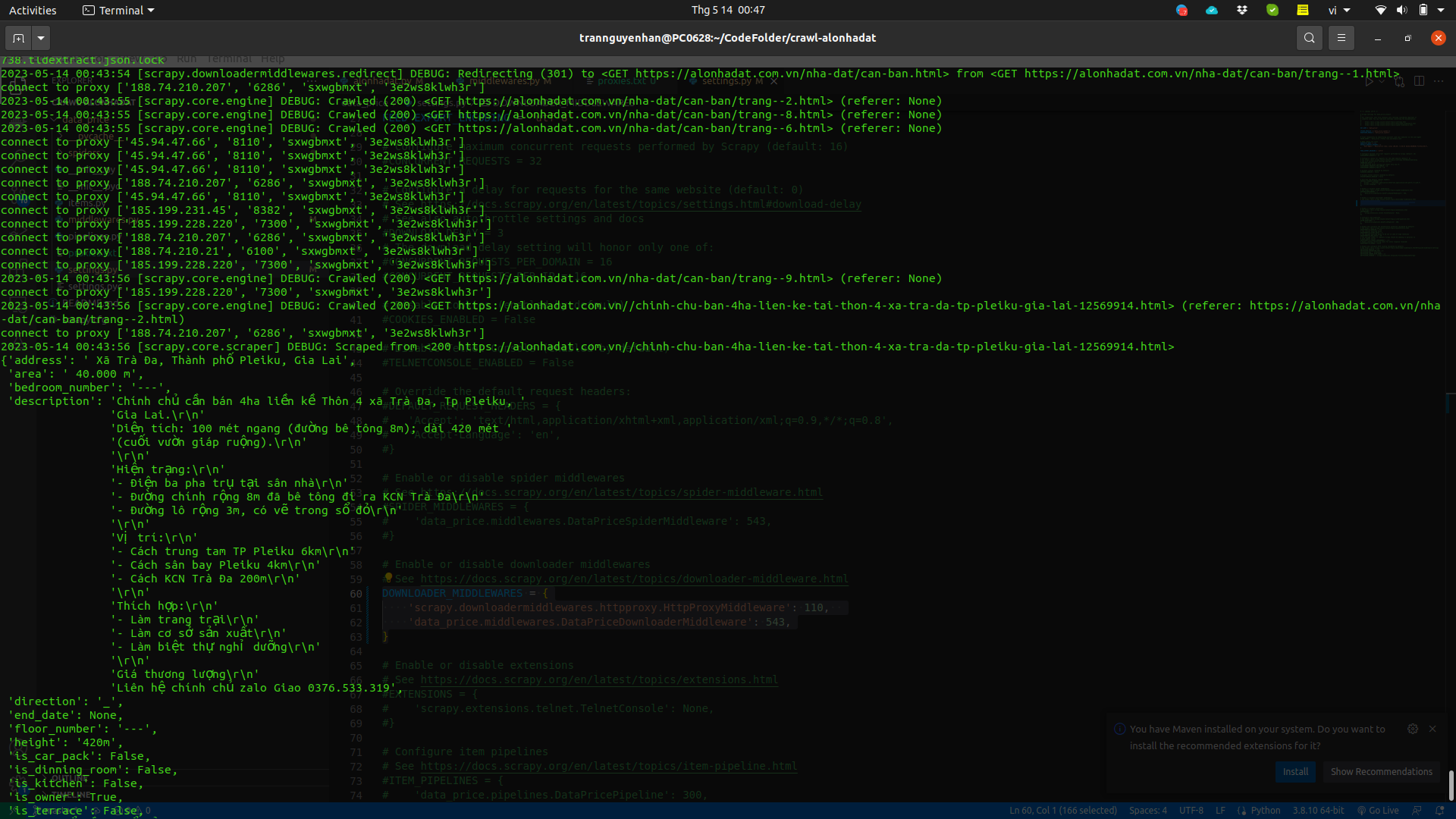
You can add a proxy pool with more proxies and add delay time in settings.py to avoid requests being sent too fast and continuously:
1
DOWNLOAD_DELAY = 2
See project details at: https://github.com/demanejar/crawl-alonhadat
Using Library to Configure Proxy for Scrapy Project
The library I’m referring to here is Rotating proxies.
Install Rotating proxies:
1
pip install scrapy-rotating-proxies
Add the ROTATING_PROXY_LIST variable to the settings.py file:
1
2
3
4
ROTATING_PROXY_LIST = [
  'host1:port1',
  'host2:port2',
]
Or use ROTATING_PROXY_LIST_PATH to configure to the proxies file:
1
ROTATING_PROXY_LIST_PATH = '/my/path/proxies.txt'
See detailed docs of this library at https://github.com/TeamHG-Memex/scrapy-rotating-proxies.
Since the website doesn’t have a comment section under the article, please discuss and give me feedback at this GITHUB DISCUSSION: https://github.com/orgs/demanejar/discussions/1.