
If we write 1 spider to analyze information for each website, it will be very time-consuming, especially for news websites. There are thousands of different news websites and they’re still growing every day.
So now there’s a problem: we need to analyze the content of 1000 news websites, and our task is to schedule crawling these 1000 news websites daily. For scheduling, we can temporarily solve it with crontab. So what about crawling 1000 websites? We can’t write 1000 spiders to parse each website! So in this article, we’ll learn more about using databases to store configurations. Specifically, in this article, we’ll use MySQL.
Many of you may wonder: what’s the purpose of analyzing content from 1000 news websites? This problem is mainly to analyze trends, keywords, hot events by day, analyze content, identify which sites often repost articles from other sites, which sites are reputable news sites to recommend to users, and many other things.
Creating Project and Defining Item
Create a Scrapy project and a news spider similar to the crawl-alonhadat article:
Creating Crawl Alonhadat Project
Define the attributes to extract from a news article. In this article, I extract 3 attributes: URL, title, content, and time:
1
2
3
4
5
6
7
8
9
10
11
12
13
14
15
# Define here the models for your scraped items
#
# See documentation in:
# https://docs.scrapy.org/en/latest/topics/items.html

import scrapy


class CrawlerItem(scrapy.Item):
    # define the fields for your item here like:
    # name = scrapy.Field()
    url = scrapy.Field()
    title = scrapy.Field()
    content = scrapy.Field()
    date = scrapy.Field()
If you want to extract more like author, images, videos, related article lists,…, you can define additional fields to extract and write corresponding code in the Spider.
Database Design
We take a representative website to analyze. Here I take kenh14. Go to kenh14’s homepage first:

We see that news sites each have a homepage containing a list of articles. This list of articles can be a list of featured articles or a list of all articles sorted by newest, depending on each site. So extracting articles from the homepage may not be enough articles and messy because it’s a combination of many categories. So we’ll extract articles by category. Depending on the problem to solve, we can filter to extract necessary data. For example, if your problem is to analyze daily trends, crawl articles from entertainment, world, lifestyle, media categories, but you don’t need to crawl articles from legal and car categories. Website categories are mainly shown as menu bars of each website.
Our project is scheduling to crawl daily, so unlike the Crawl Alonhadat project that has to next sometimes up to 4000 pages to get enough data for machine learning or deep learning models, for projects like this, if scheduling to run daily, we only need to get the newest articles of today or at most run a few more days. In this project, for each category, I only crawl articles found on the first page and schedule to crawl again hourly. Many of you are afraid of duplicate articles, but this isn’t too big a problem. We can take the article URL and HASH it to use as ID to update to the database (Postgre, Elasticsearch,…), so duplicate key articles will be updated and won’t be added as multiple records in the database. If crawling is missing articles, we need to consider reducing frequency from 1h down to 30m, 20m, or increasing the number of articles per crawl from 1 page to 2-3 pages.
I design the database for this project with 3 tables:
websitestable:

x_path_categoriestable:
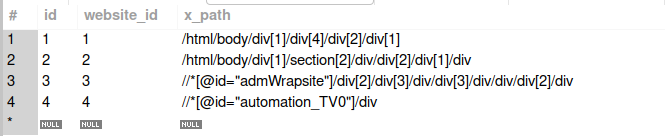
x_path_contentstable:

For the cases I consider in this project, these are the simplest cases: listing pages of categories of each website have the same structure, and detail pages of articles of each website also have only 1 type.
For example, for the vietnamnet site, pages like vietnamnet.vn/vn/thoi-su, vietnamnet.vn/vn/kinh-doanh, vietnamnet.vn/vn/giai-tri, vietnamnet.vn/vn/the-gioi all have the same website structure, so the x_path_categories table only needs to contain the website ID and store the x_path of the tag wrapping the article list.
The x_path_contents table is quite easy to understand. When entering a detail page, it’s the x_path to extract each piece of information we need. Here I also consider a simple case where a website only has one type of article detail page.
Connecting to Database
Install the library to connect to the database for Python:
1
pip3 install mysql-connector-python
Now that we have a database, we need to write code to connect to the database for the Scrapy project.
Create a constants.py file to store database information:
1
2
3
4
5
HOST = "localhost"
USER = "root"
PASSWORD = "mysql12345"
DATABASE = "x_news"
PORT = "3306"
The connector.py file will get corresponding information from the database:
1
2
3
4
5
6
7
8
9
10
11
12
13
14
15
16
17
18
19
20
21
22
23
24
25
26
27
28
29
30
31
32
33
34
35
36
37
38
39
40
41
42
43
44
import mysql.connector
from crawler.spiders import constants

db = mysql.connector.connect(
    host=constants.HOST,
    user=constants.USER,
    password=constants.PASSWORD,
    database=constants.DATABASE,
    port=constants.PORT
)
cursor = db.cursor()

# get all website in database
def get_all_websites():
    cursor.execute("select * from websites")
    rows = cursor.fetchall()

    result = []
    for row in rows:
        result.append(row)

    return result

# get all url categories of website
def get_categories(website_id):
    cursor.execute("select * from x_path_categories where website_id = " + str(website_id))
    rows = cursor.fetchall()

    result = []
    for row in rows:
        result.append(row[2])

    return result

# get x_path of title, content of url website
def get_contents(website_id):
    cursor.execute("select * from x_path_contents where website_id = " + str(website_id))
    rows = cursor.fetchall()

    result = []
    for row in rows:
        result.append({"title": row[2], "content": row[3], "date": row[4]})

    return result
Writing Spider
If everyone follows this series regularly, you’ll see that when I write Spider, I usually use 3 functions: start_requests to prepare article listing links, parse_links to get a list of article detail links from article listing pages, and parse to extract necessary information from article detail pages.
start_requests Function
1
2
3
4
5
6
7
8
9
def start_requests(self):
    list_websites = get_all_websites()
    for website in list_websites:
        domain = website[1] # get domain of website: https://vietnamnet.vn
        categories = json.loads(website[2]) # get list category of website: /thoi-su, /chinh-tri

        for category in categories:
            link = domain + category
            yield scrapy.Request(url=link, callback=self.parse_links, meta={"website_id": website[0], "domain": website[1]})
This function creates URLs for each category of websites from data in the database (data in the database, you can see more in the database design section above). These links are article listing links. For example, the first record has domain = https://vietnamnet.vn and category = ["/vn/thoi-su/", "/vn/kinh-doanh/", "/vn/giai-tri/", "/vn/the-gioi/"], then it will go through each category one by one, combining them into complete URLs: https://vietnamnet.vn/vn/thoi-su/, https://vietnamnet.vn/vn/kinh-doanh/, https://vietnamnet.vn/vn/giai-tri/, https://vietnamnet.vn/vn/the-gioi/. These URLs are the article listing URLs of each category. Now send them to the parse_link function to continue working.
parse_link Function
1
2
3
4
5
6
7
8
9
10
11
12
13
14
def parse_links(self, response):
    result = set()

    x_path_categories = get_categories(response.meta.get("website_id"))
    for x_path_category in x_path_categories:
        x_path = x_path_category + "//a/@href" # get all tag a, after get all attribute href contain link of post in website news
        list_href = response.xpath(x_path).extract()

        for href in list_href:
            if len(href) > 50 and ("http" not in href): # link have less than 50 character maybe not is link of post
                result.add(response.meta.get("domain") + href)

    for item in result:
        yield scrapy.Request(url=item, callback=self.parse, meta={"website_id": response.meta.get("website_id")})
In the start_request function, we already sent the additional parameter "website_id": website[0] down. website_id helps us find the x_path of the element wrapping the article list through the x_path_categories table. Use the get_categories function already written in the database connection section to get the corresponding x_path, extract the list of URLs of each article, and call the final parse function.
Note that we still need to send website_id down to the parse function so we can get x_path information in articles defined in the database in the x_path_contents table.
parse Function
1
2
3
4
5
6
7
8
9
10
11
12
13
14
15
16
17
18
def parse(self, response):
    posts = get_contents(response.meta.get("website_id"))
    for post in posts:
        content = response.xpath(post["content"] + "").extract_first()
        title = response.xpath(post["title"] + "//text()").extract_first()
        date = response.xpath(post["date"] + "//text()").extract_first()

        content = self.normalize(content)
        title = self.normalize(title)
        date = self.normalize(date)

        crawlerItem = CrawlerItem()
        crawlerItem['content'] = content
        crawlerItem['title'] = title
        crawlerItem['date'] = date
        crawlerItem['url'] = response.url

        yield crawlerItem
This function is quite clear about its purpose. For each corresponding x_path in the database, extract corresponding data and return CrawlerItem.
Running and Scheduling Project
This article is in the Crawl series, so I mainly talk about crawling and storage for crawling, and less about its flow.
You can follow the complete project with data flow from scheduling crawl -> queue -> Spark Streaming -> Spark ML at https://github.com/trannguyenhan/X-news (This source code is also quite old, some things related to Kibana, ElasticSearch are also not updated to the repo, so you mainly use it for reference)
Run the project with the command:
1
scrapy crawl news
This project I’m writing a pipeline file with output data pushed to a Kafka queue for another side to receive and process data later. The pipelines.py file is written as below:
1
2
3
4
5
6
7
8
9
10
11
12
13
14
15
16
17
18
19
20
21
# Define your item pipelines here
#
# Don't forget to add your item pipeline to the ITEM_PIPELINES setting
# See: https://docs.scrapy.org/en/latest/topics/item-pipeline.html

# useful for handling different item types with a single interface
from itemadapter import ItemAdapter
from kafka import KafkaProducer
import json

class CrawlerPipeline:
    def open_spider(self, spider):
        self.producer = KafkaProducer(bootstrap_servers=['localhost:9092'], \
            value_serializer=lambda x: json.dumps(x, ensure_ascii=False).encode('utf-8'))
        self.topic = "x_news_1"

    def process_item(self, item, spider):
        line = ItemAdapter(item).asdict()
        self.producer.send(self.topic, value=line)
        return item
The entire Crawl project you can refer to at the GITHUB link: https://github.com/demanejar/crawler-1000news.
To schedule the Spider to run daily, you can use crontab. This works quite simply, just copy the run command into the file and it scans through. See more about cron at https://viblo.asia/p/task-schedule-trong-laravel-naQZRkOqlvx#_crontab-0.
Since the website doesn’t have a comment section under articles, everyone can discuss and give feedback to me at this GITHUB DISCUSSION: https://github.com/orgs/demanejar/discussions/1.