
In this article, I will introduce in detail how to create a project with Scrapy and use it to analyze and extract housing data from the Alonhadat website. If your machine doesn’t have Scrapy yet, you can install it with pip. See details at https://pypi.org/project/Scrapy/.
If you’re interested in a complete data flow from
crawl data->cleaning->analysis and visualization->machine learning->demo website, you can refer to the repo https://github.com/trannguyenhan/house-price-prediction
Creating a Scrapy Project
Create a Scrapy project with the command:
1
scrapy startproject crawlerdata
Create an alonhadat spider with the command:
1
scrapy genspider alonhadat alonhadat.com.vn
Defining Data to Extract
Define the fields to extract clearly in the items.py file:
1
2
3
4
5
6
7
8
9
10
11
12
13
14
15
16
17
18
19
20
21
22
23
24
25
26
import scrapy


class DataPriceItem(scrapy.Item):
    # define the fields for your item here like:
    # name = scrapy.Field()
    area = scrapy.Field()  # dien_tich \ double
    address = scrapy.Field()  # dia_chi \ string
    description = scrapy.Field()  # mo_ta \ string
    floor_number = scrapy.Field()  # so_lau (so_tang) \ int
    bedroom_number = scrapy.Field()  # so_phong_ngu \ int
    is_dinning_room = scrapy.Field()  # co_phong_an? \ boolean
    is_kitchen = scrapy.Field()  # co_bep? \ boolean
    is_terrace = scrapy.Field()  # co_san_thuong? \ boolean
    is_car_pack = scrapy.Field()  # co_cho_de_xe_hoi? \ boolean
    is_owner = scrapy.Field()  # chinh_chu? \ boolean
    start_date = scrapy.Field()  # ngay_dang_tin \ date || string
    end_date = scrapy.Field()  # ngay_ket_thuc \ date || string
    type = scrapy.Field()  # in('nha_mat_tien', 'nha_trong_hem') \ string
    direction = scrapy.Field()  # phuong_huong_nha (nam, bac, dong, tay) \ string
    street_in_front_of_house = scrapy.Field()  # do_rong_duong_truoc_nha \ int
    width = scrapy.Field()  # chieu_dai \ string
    height = scrapy.Field()  # chieu_rong \ string
    law = scrapy.Field()  # phap_ly \ string

    price = scrapy.Field()  # gia_nha \ double
Since crawling data is only the first step in our entire data flow, we need commands to clearly record the fields to avoid confusion later and also to make it easier to understand and approach the project when looking back later.
For this simple first project, we don’t need to worry about middlewares.py or pipelines.py files yet. Code in these files is temporarily left as default.
Editing the settings.py File
Edit the settings.py file:
1
2
3
4
5
6
7
8
9
10
11
12
BOT_NAME = 'data_price'

SPIDER_MODULES = ['data_price.spiders']
NEWSPIDER_MODULE = 'data_price.spiders'

# Obey robots.txt rules
ROBOTSTXT_OBEY = True
DEFAULT_REQUEST_HEADERS = {
    'User-Agent': 'Mozilla/5.0 (X11; Linux x86_64; rv:48.0) Gecko/20100101 Firefox/48.0',
}

FEED_EXPORT_ENCODING = 'utf-8'
If your newly created Scrapy program has the variable ROBOTSTXT = False, please set it to True. For specific reasons, you can review my previous article https://demanejar.github.io/posts/what-is-crawler-and-something/#s%E1%BB%AD-d%E1%BB%A5ng-file-robotstxt
Writing Spider to Analyze Website HTML
In AlonhadatSpider, we will need to write 3 functions: start_requests, parse_link, parse.
start_requests Function
This function will be run first and will be responsible for initializing the links to crawl. This is a bit hard to understand, let me give an example. For example, you need to crawl the alonhadat website from page 3501 to page 4501, then first you need to analyze how the URLs of this website are designed. Go to the website and check a few pages:
1
2
3
https://alonhadat.com.vn/nha-dat/can-ban.html
https://alonhadat.com.vn/nha-dat/can-ban/trang--2.html
https://alonhadat.com.vn/nha-dat/can-ban/trang--3.html
From the above, we can temporarily conclude that the URLs of this website between pages 1, 2 are in the form ../trang--i.html. Based on that assumption, we write the start_requests function:
1
2
3
4
5
6
7
8
def start_requests(self):
    pages = []
    for i in range(3501,4501):
        domain = 'https://alonhadat.com.vn/can-ban-nha/trang--{}.htm'.format(i)
        pages.append(domain)

    for page in pages:
        yield scrapy.Request(url=page, callback=self.parse_link)
So we’ve finished initializing the links to crawl. Now each created link will be input for the parse_link function.
parse_link Function
The task of this function is to get all article links in each listing page created in the start_requests function. For example, when entering a listing page like the following:
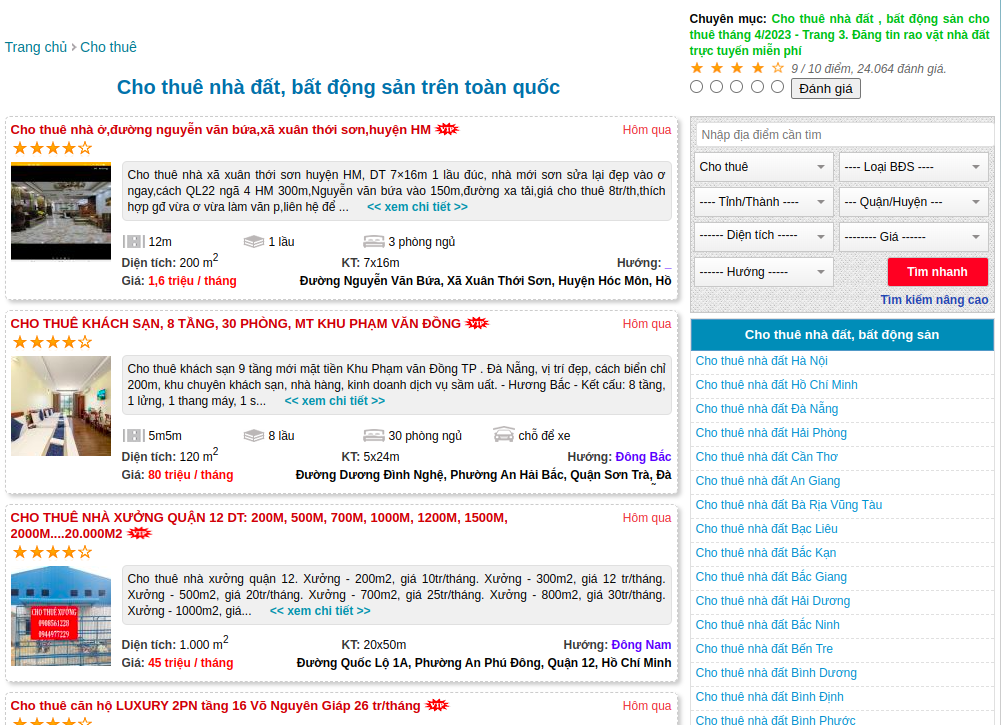
The result we need to achieve is a list of those article links:
1
2
3
4
5
[
  'https://alonhadat.com.vn/cho-thue-nha-o-duong-nguyen-van-bua-xa-xuan-thoi-son-huyen-hm-12662015.html',
  'https://alonhadat.com.vn/cho-thue-khach-san-8-tang-30phong-mt-khu-pham-van-dong-12682000.html',
  ...
]
Right-click on the element you need to get xpath or css selector (with xpath or css selector, they’re the same. I prefer using css selector, so from now on I will mainly mention css selector) to get the css selector of the element:
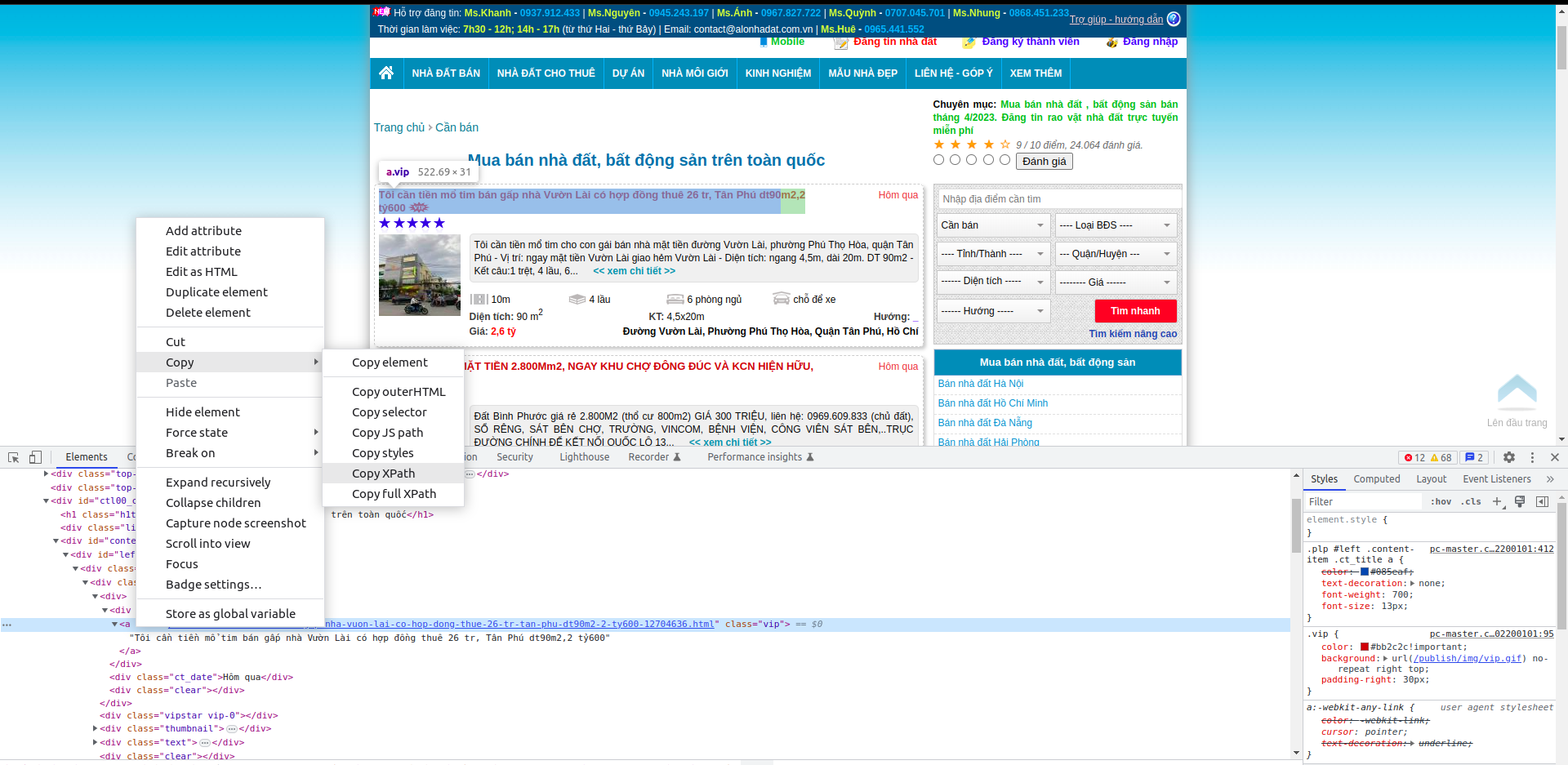
In this case, the css selector of the element containing the first article URL is (it’s an a tag element):
1
#left > div.content-items > div:nth-child(1) > div:nth-child(1) > div.ct_title > a
In Scrapy, to get additional attributes, we add ::attr(href) where href is the attribute of that element. So to get the URL contained in the href attribute of the a tag, the css selector will be added as follows:
1
#left > div.content-items > div:nth-child(1) > div:nth-child(1) > div.ct_title > a::attr(href)
Note: I also note here about getting
CSS SELECTORthis way. First, it’s very easy to change. Next, getting it this way, you will only get it for one element you need to extract. In later articles, I will guide everyone on how to get thecss selectorof each element by analyzing the unique attributes of that element or adjacent elements. For this article, we’ll continue with this method.
This is only the css selector of the first article URL. For subsequent article URLs, we do the same and we’ll have a list of css selector containing article URLs as follows:
1
2
3
4
#left > div.content-items > div:nth-child(1) > div:nth-child(1) > div.ct_title > a::attr(href)
#left > div.content-items > div:nth-child(2) > div:nth-child(1) > div.ct_title > a::attr(href)
#left > div.content-items > div:nth-child(3) > div:nth-child(1) > div.ct_title > a::attr(href)
#left > div.content-items > div:nth-child(4) > div:nth-child(1) > div.ct_title > a::attr(href)
Based on the predicted structure of the css selector containing article links, we’ll write the parse_link function as follows:
1
2
3
4
5
6
7
def parse_link(self, response):
    for i in range(1, 21):
        str = '#left > div.content-items > div:nth-child({}) > div:nth-child(1) > div.ct_title > a::attr(href)'.format(i)
        link = response.css(str).extract_first()
        link = 'https://alonhadat.com.vn/' + link

        yield scrapy.Request(url=link, callback=self.parse)
Why is it range(1, 21)? Based on analyzing the website, we can see that a listing page will have 21 articles. Now each article URL will be input for the parse function. The next task is to analyze and extract the necessary data defined in the Item class.
parse Function
With the way of getting css selector as above, we can quickly write the parse function as follows:
1
2
3
4
5
6
7
8
9
10
11
12
13
14
15
16
17
18
19
20
21
22
23
24
25
26
def parse(self, response, **kwargs):
    item = DataPriceItem()
    item['price'] = self.extract(response, '#left > div.property > div.moreinfor > span.price > span.value')

    item['description'] = self.extract(response, '#left > div.property > div.detail.text-content')
    item['address'] = self.extract(response, '#left > div.property > div.address > span.value')
    item['area'] = self.extract(response, '#left > div.property > div.moreinfor > span.square > span.value')
    item['start_date'] = self.extract(response, '#left > div.property > div.title > span', 'start_date')
    item['end_date'] = None

    result_table = self.extract_table(response.css('table').get())
    item['floor_number'] = result_table[0]
    item['bedroom_number'] = result_table[1]
    item['is_dinning_room'] = result_table[2]
    item['is_kitchen'] = result_table[3]
    item['is_terrace'] = result_table[4]
    item['is_car_pack'] = result_table[5]
    item['is_owner'] = result_table[6]
    item['type'] = result_table[7]
    item['direction'] = result_table[8]
    item['street_in_front_of_house'] = result_table[9]
    item['width'] = result_table[10]
    item['height'] = result_table[11]
    item['law'] = result_table[12]

    yield item
In this function, we must declare a DataPriceItem and return that object so the Scrapy flow can run smoothly. The extract or extract_table functions are additional functions written to reuse code.
To see the detailed code of the project, you can view it at the Demanejar project repo: https://github.com/demanejar/crawl-alonhadat.
In the project, I also use the BeautifulSoup library to analyze HTML code (used in the extract_table function, you can go to the repo on GitHub to see details). BeautifulSoup is also a quite famous library for extracting and analyzing information from websites. However, for me, BeautifulSoup is stronger in analyzing HTML code, and I also often use BeautifulSoup in Scrapy to analyze some HTML code segments.
Running Scrapy
Finally, after writing everything, run the project to extract data. Run the command:
1
scrapy crawl alonhadat -o ../data/output.json --set FEED_EXPORT_ENCODING=utf-8
Raw crawled data you can refer to at: https://github.com/trannguyenhan/house-price-prediction/tree/master/data.
Currently, alonhadat has some measures to avoid being crawled. In this article, I haven’t mentioned how to bypass this blocking by alonhadat. I will mention more in later articles in this series. This article is just about how to analyze and extract data from the website. For the repos mentioned in the article, if you find them useful, please give the repos a star. Thank you everyone! I’ll end this article here.
Since the website doesn’t have a comment section under articles, everyone can discuss and give feedback to me at this GITHUB DISCUSSION: https://github.com/orgs/demanejar/discussions/1.