
Proxy is probably a concept that’s no longer unfamiliar to everyone. For people working on data crawling, proxy is like an inseparable companion. In this article, I will guide how to configure proxy for a Scrapy project. The project I use as an example for this article is the crawl alonhadat project https://github.com/demanejar/crawl-alonhadat.
For each of my articles like this one “Configuring Proxy for Scrapy Project”, but I don’t want to only talk about how to configure proxy in the project. I want to talk a bit more broadly about related issues. If you’re interested in the main point of how to configure proxy for a Scrapy project, you can skip this introduction and scroll down a bit more to the next section of the article.
Proxy and Websites Blocking Bots Based on Abnormal Traffic
In the previous article, we analyzed the website and wrote a program to collect data. However, that’s not enough. Now alonhadat has implemented banning IPs that have high traffic within a certain time period. The most obvious thing is that just running the project for about 4-5 minutes (or less, just 2-3 minutes) will see a bunch of exceptions generated, and after accessing the alonhadat website again, you’ll get the result:
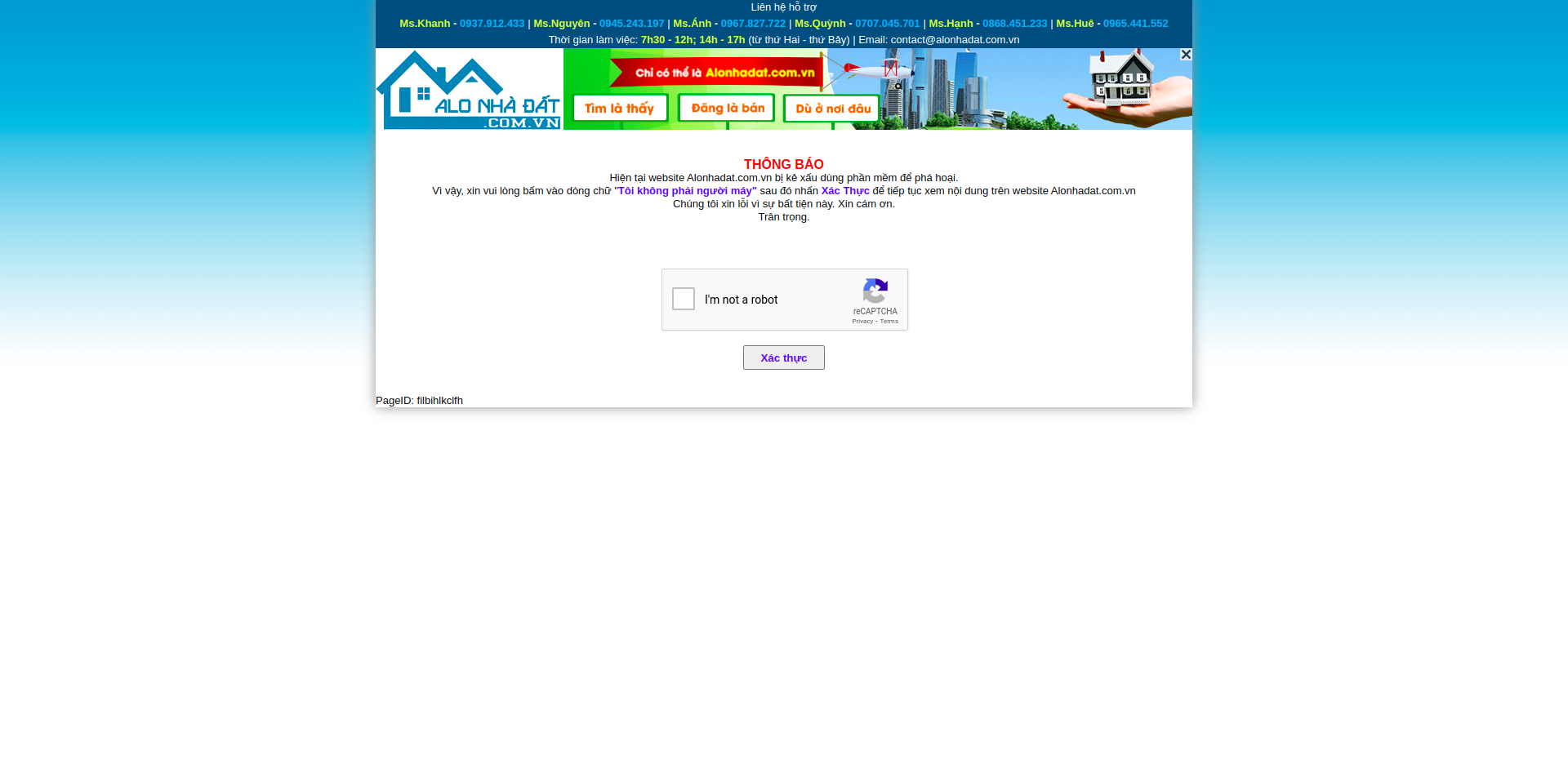
With this image, we can temporarily predict that alonhadat is blocking bots by IP, because besides bots being forced to pass captcha, real users entering the website are also being forced to pass captcha. This method is one of the simplest ways to protect websites from crawling bots. Just see any IP with abnormal traffic and ban it immediately. After 1-2 days or 1-2 months, unban it, and if it’s abnormal again, ban it again.
For websites using this blocking method, there are basically 2 ways to avoid it:
1 is to use proxies, lots of proxies. It depends on how the website blocks. If the blocking threshold of the website is small (threshold here I’m referring to is the number of website accesses within a certain time period), then we’ll need a lot of proxies. If this threshold is higher, we may need fewer proxies. As for how many proxies are enough, it needs to be tested. For example, before I crawled the website https://www.yelp.com/, I used a pool with 10 proxies, each request spaced 2 seconds apart, and each request would pick a random proxy to access the website. After 2-3 hours, all 10 proxies were banned. So I decided to increase to 100. This time it lasted longer, after one night all 100 proxies were also banned. The problem is now we need even more proxies. What about 1000? And that’s just a prediction, and because 1000 proxies cost so much money, I decided to stop.
2 is harder, which is to write a script to bypass captcha. This method isn’t always usable because some websites block directly instead of forcing users to pass captcha to continue viewing content. A typical example is https://www.yelp.com/, and this website of course has a higher blocking threshold. Since these captchas are very easy to change to another type, the scripts you write will also only work for a fairly short time. And currently there are also many very complex types of captchas. Being able to bypass these new types of captchas is generally difficult.
This blocking method also brings a pretty bad experience for users. When I was crawling, alonhadat was banning my IP and I had to pass captcha when entering the website, but my roommates using the same WiFi and having the same IP were also being forced to pass captcha like that even though they didn’t do anything. So it’s possible that the website is using this method temporarily while they research to have a better solution.
Data Flow and Architecture of Scrapy
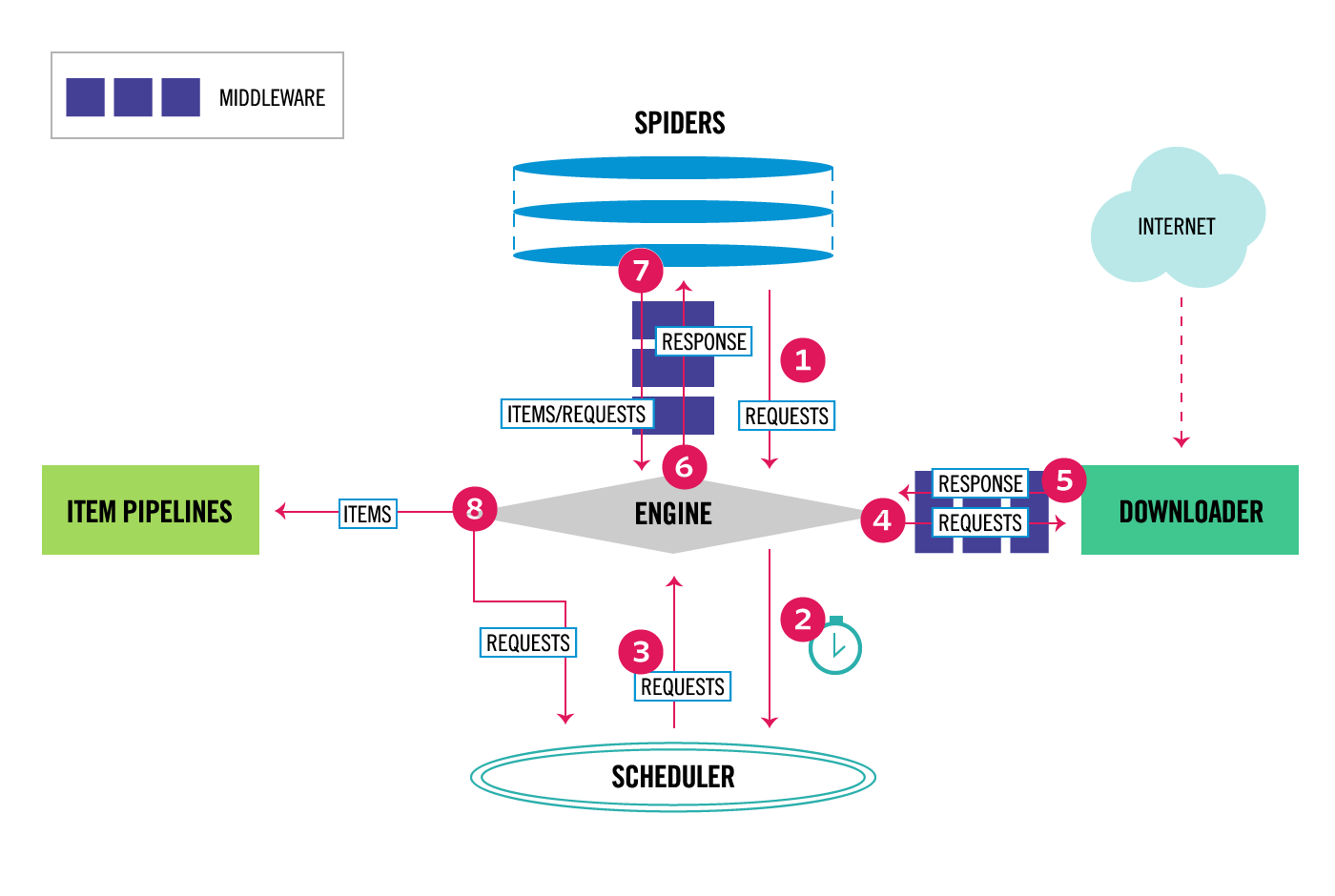
Scrapy consists of 6 components:
Scrapy Engine: responsible for controlling data flow between components in the system, triggering some events under certain conditions
Downloader: finds and downloads HTML code segments from specified websites
Spiders: this is where we mainly work, where we write code to analyze websites
Item Pipeline: responsible for processing Items extracted and created by Spiders
Middleware: there will be 2 types of middleware. 1 is middleware between Spiders and Engine. This middleware is usually used less because code written in Spider Middleware can also be replaced by writing in Spiders or Item Pipeline. 2 is Downloader Middleware between Downloader and Engine. It aims to process requests before they are sent to Downloader. The most typical example is adding proxy to requests
By understanding each component and the function of each component, I’m sure everyone has imagined that we will configure proxy for each request in Downloader Middleware.
Configuring Proxy for Scrapy Project
If you don’t know which website to use proxies from, you can refer to the website https://proxy.webshare.io/. Proxies on this website are cheap and quite good quality. Each account also has 10 free proxies for testing.
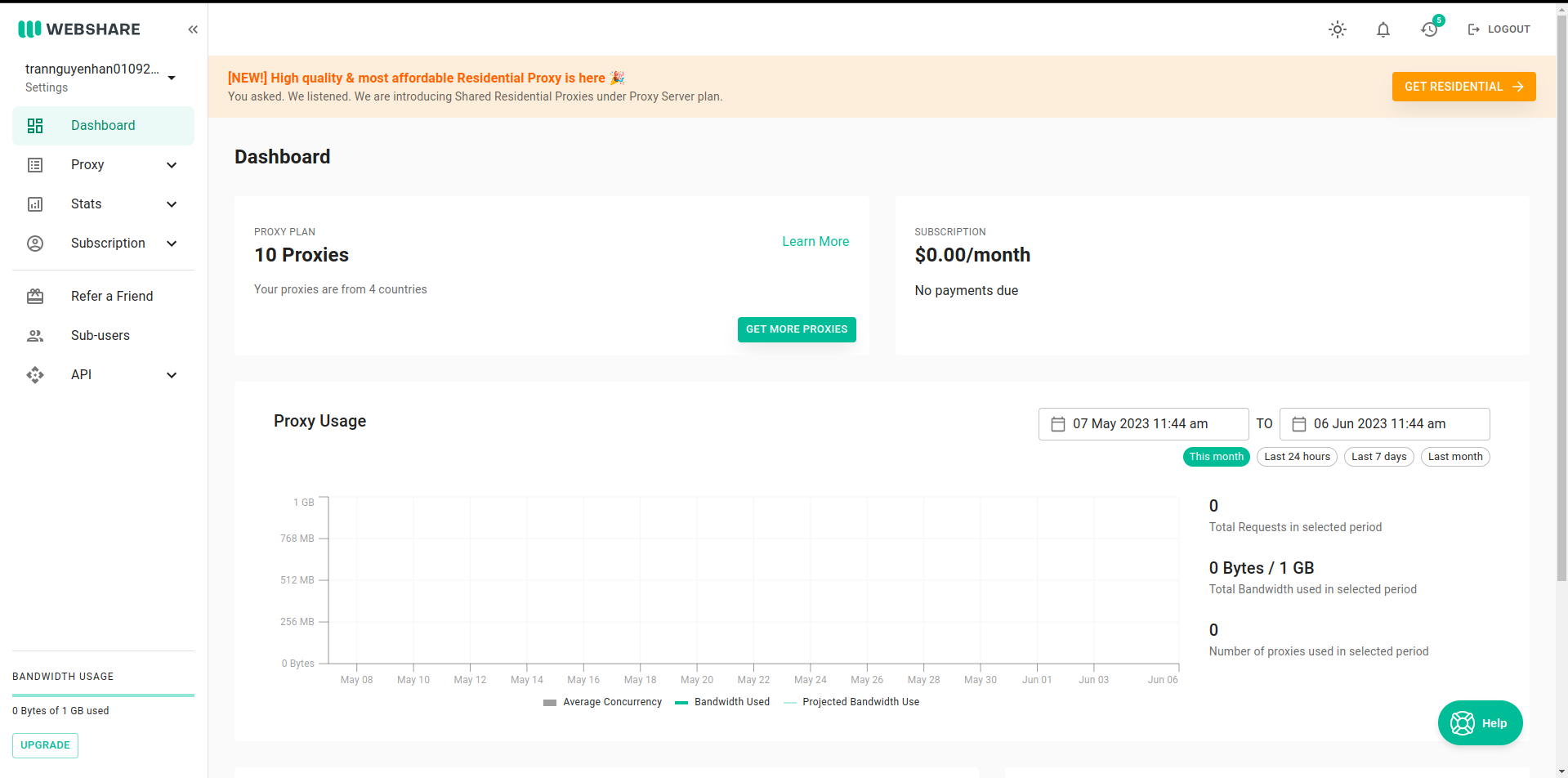
Go to Proxy -> List -> Download to download the proxy list. Rename the downloaded file to proxies.txt and copy it to the project folder.
The middlewares.py file is where the code for Spider Middleware and Downloader Middleware is stored. In the file, there are 2 classes and methods defined and commented clearly on how to use them.
To add proxy to requests before they are sent to Downloader, we will write in the process_request function of the DataPriceDownloaderMiddleware class:
1
2
3
4
5
6
7
8
9
10
11
12
13
14
15
16
17
18
19
20
21
22
23
24
25
26
27
28
29
30
31
32
33
34
35
36
37
38
39
40
41
42
43
44
45
46
47
48
49
50
51
52
53
54
55
56
57
58
59
60
from w3lib.http import basic_auth_header
import random

proxyPools = open("data_price/proxies.txt", "r").read().split("\n")

class DataPriceDownloaderMiddleware(object):
    # Not all methods need to be defined. If a method is not defined,
    # scrapy acts as if the downloader middleware does not modify the
    # passed objects.

    @classmethod
    def from_crawler(cls, crawler):
        # This method is used by Scrapy to create your spiders.
        s = cls()
        crawler.signals.connect(s.spider_opened, signal=signals.spider_opened)
        return s

    def process_request(self, request, spider):
        # Called for each request that goes through the downloader
        # middleware.

        # Must either:
        # - return None: continue processing this request
        # - or return a Response object
        # - or return a Request object
        # - or raise IgnoreRequest: process_exception() methods of
        #   installed downloader middleware will be called
        return None

    def process_response(self, request, response, spider):
        # Called with the response returned from the downloader.

        # Must either;
        # - return a Response object
        # - return a Request object
        # - or raise IgnoreRequest

        proxy = random.choice(proxyPools).split(":")
        httpsProxy = proxy[0]
        portProxy = proxy[1]
        usernameProxy = proxy[2]
        passwordProxy = proxy[3]

        request.meta['proxy'] = "http://" + httpsProxy + ":" + portProxy
        request.headers['Proxy-Authorization'] = basic_auth_header(usernameProxy, passwordProxy)

        return response

    def process_exception(self, request, exception, spider):
        # Called when a download handler or a process_request()
        # (from other downloader middleware) raises an exception.

        # Must either:
        # - return None: continue processing this exception
        # - return a Response object: stops process_exception() chain
        # - return a Request object: stops process_exception() chain
        pass

    def spider_opened(self, spider):
        spider.logger.info('Spider opened: %s' % spider.name)
We define a
proxyPoolsbeforehand that reads from theproxies.txtfile just added to the projectIn
process_request, we will pick a random proxy and add it to headers
Now go to the settings.py file, find the DOWNLOADER_MIDDLEWARES location, uncomment it, and add another HttpProxyMiddleware so these Middlewares are called when starting to crawl:
1
2
3
4
DOWNLOADER_MIDDLEWARES = {
    'scrapy.downloadermiddlewares.httpproxy.HttpProxyMiddleware': 600,
    'data_price.middlewares.DataPriceDownloaderMiddleware': 543,
}
Set the number of HttpProxyMiddleware larger than DataPriceDownloaderMiddleware so it’s called after. The numbers 543 and 600 are priorities so the system knows which one to call first.
Now run the project again and we’ll see results returned one by one, whereas just now there were many exception errors due to elements not being found:
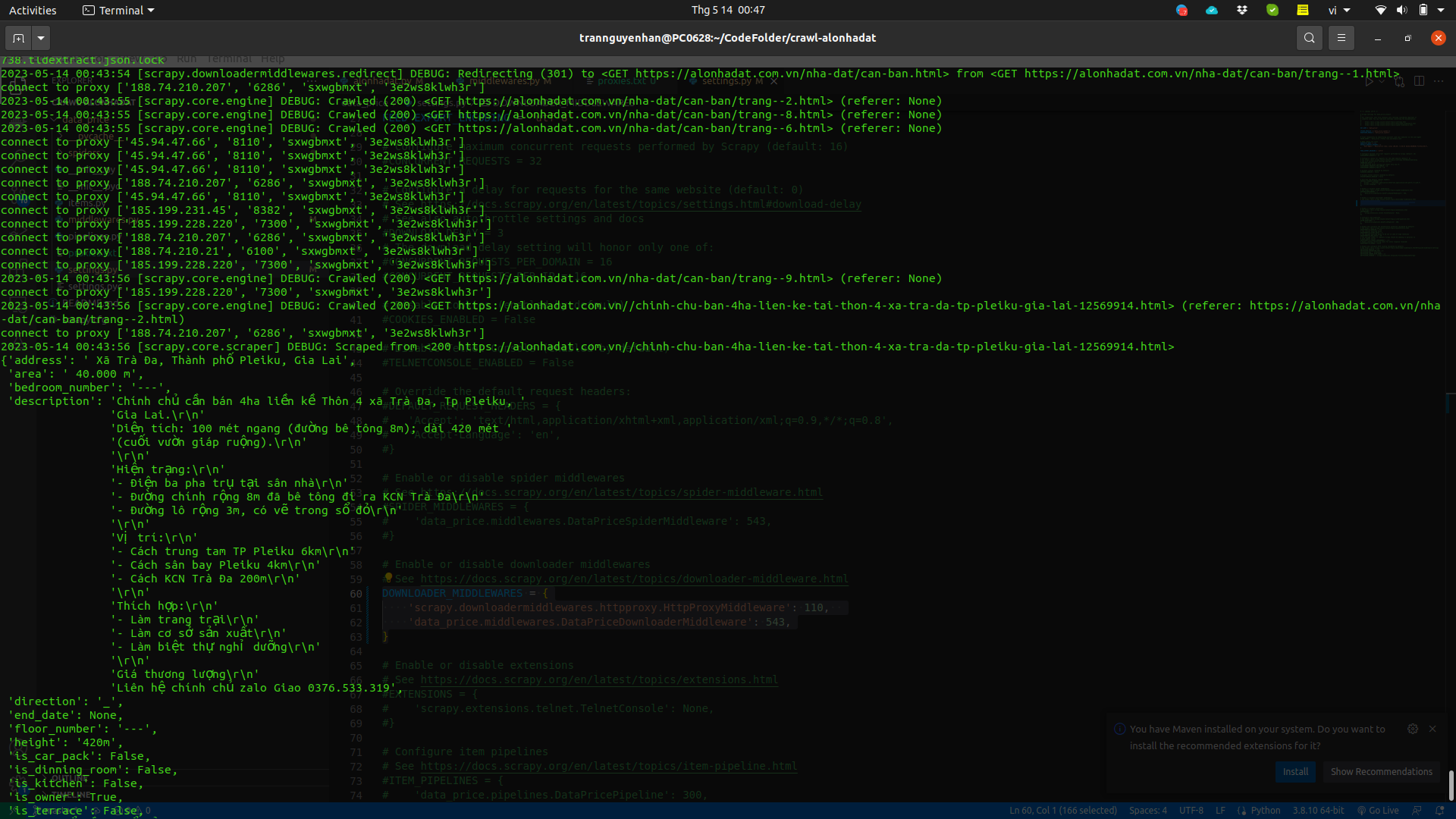
You can add a proxy pool with more proxies and add delay time in settings.py to avoid requests being sent too quickly and continuously:
1
DOWNLOAD_DELAY = 2
View detailed project at: https://github.com/demanejar/crawl-alonhadat
Using Libraries to Configure Proxy for Scrapy Project
The library I’m talking about here is Rotating proxies.
Installing Rotating proxies:
1
pip install scrapy-rotating-proxies
Add the ROTATING_PROXY_LIST variable to the settings.py file:
1
2
3
4
ROTATING_PROXY_LIST = [
  'host1:port1',
  'host2:port2',
]
Or use ROTATING_PROXY_LIST_PATH to configure to the proxies file:
1
ROTATING_PROXY_LIST_PATH = '/my/path/proxies.txt'
View detailed docs of this library at https://github.com/TeamHG-Memex/scrapy-rotating-proxies.
Since the website doesn’t have a comment section under articles, everyone can discuss and give feedback to me at this GITHUB DISCUSSION: https://github.com/orgs/demanejar/discussions/1.