
While working on a big data storage and processing project at school, I learned about Kafka and used it in my project. However, at that time I only knew simply that it was a message queue to pour data into, helping reading and writing from source to destination not depend on each other (loosely couple). So I later researched the concepts and how it works in more detail and wrote it here.
Apache Kafka is a system created by LinkedIn to serve stream processing of data and then was open-sourced. Initially it was seen as a message queue but was later developed into a distributed streaming platform (many terms are hard to translate into Vietnamese!!).
Problems in Big Data
3V in big data: data with large volume is generated every second in different formats (structured, semi-structured, unstructured). To handle the above problem, we need to aggregate data from sources such as HDFS, NoSQL DB, RDBMS,… However, how can we process simultaneously and not depend on each other (loosely couple) for those data sources -> Kafka is a solution.
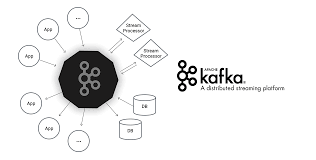
Some Components in Kafka
Overview
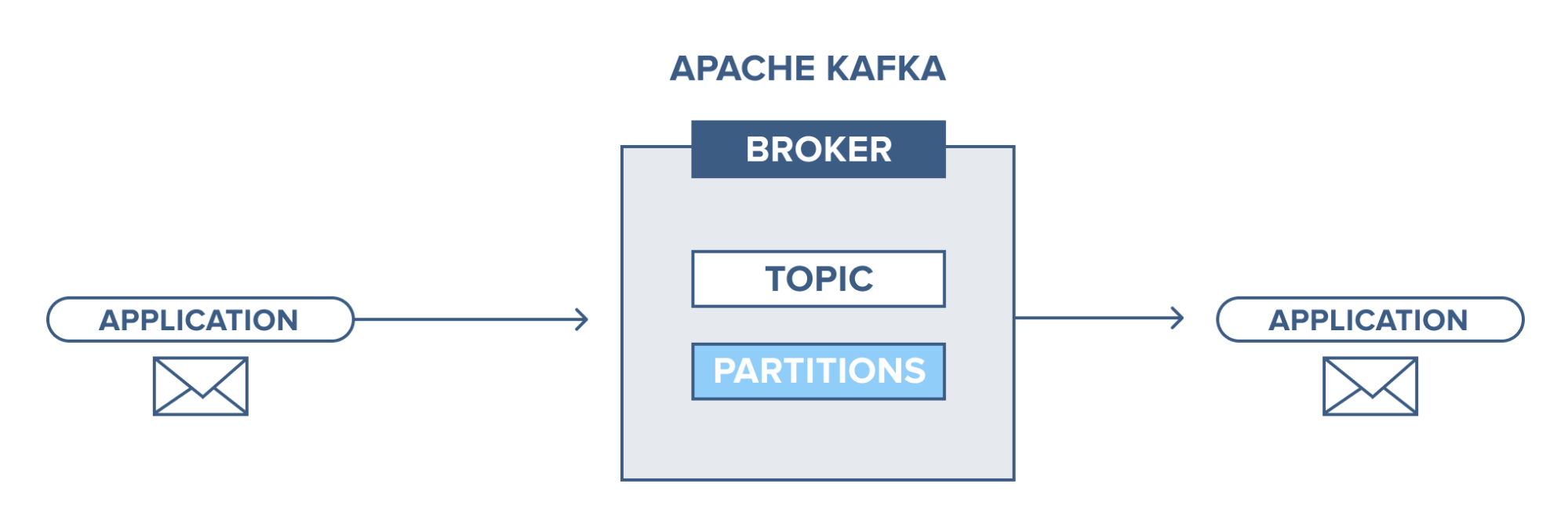
An application connects to this Kafka system and sends messages (records) to a topic. Messages can be anything, for example system logs, events,… Then another application connects and retrieves messages (records) from the topic. Data is still stored on disk until the preset time expires (retention time).
Broker
Here we refer to the Kafka cluster, where we will have servers running Kafka. This contains topics that producers send data to and consumers will retrieve data from here.
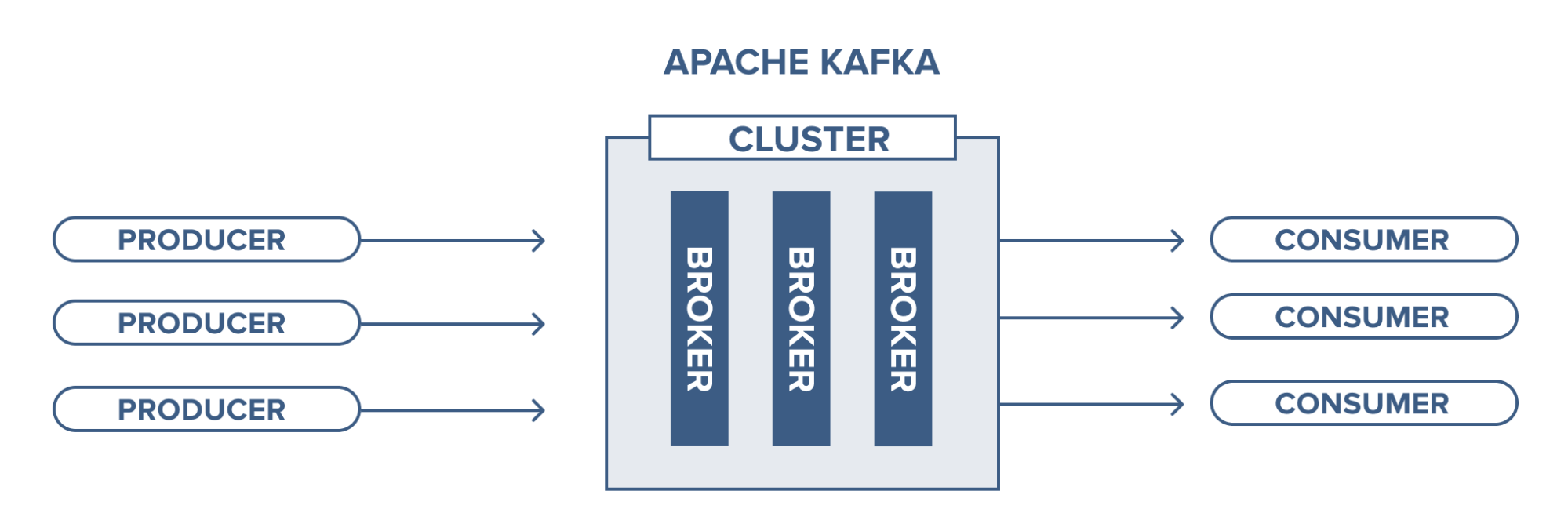
Broker management is performed by Zookeeper. A Kafka cluster can also have more than 1 Zookeeper.
Topic
Topic is where data records are stored and used.
Records put into a topic will have an “offset” which is their position index to help consumers identify and retrieve them. Consumers can adjust this position to retrieve in the desired order, for example when we want to process from the beginning, we can set the earliest offset.
Topic Partition
As mentioned in the previous section, each record has its own offset and in topics we have the concept of partition, i.e., fragmentation. A topic can have multiple partitions and records will be stored in those partitions with offset values. This will help consumers read data from topics in parallel, for example, if a topic has 4 partitions, we have 1 consumer and this consumer will read from all 4 partitions of that topic.
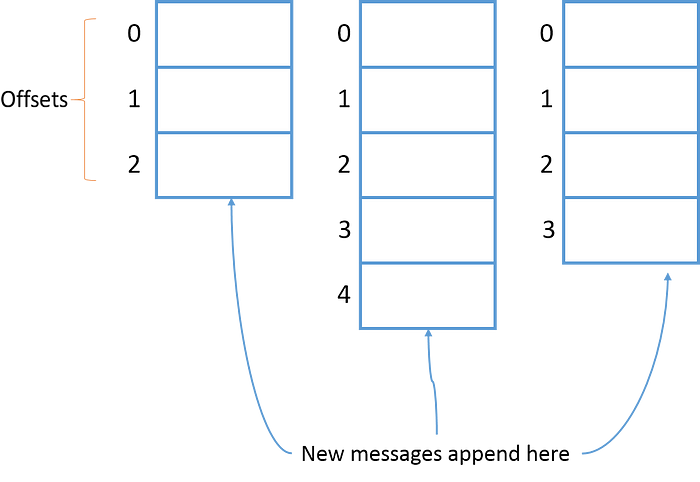
Topic partitions can be located on different brokers, so this will help the topic be accessible from multiple brokers.
Topic data backup is when we set the replication-factor when creating a topic. For example, when we create a topic with 3 partitions and replication-factor of 3, we will get the result as shown below. This ensures availability.
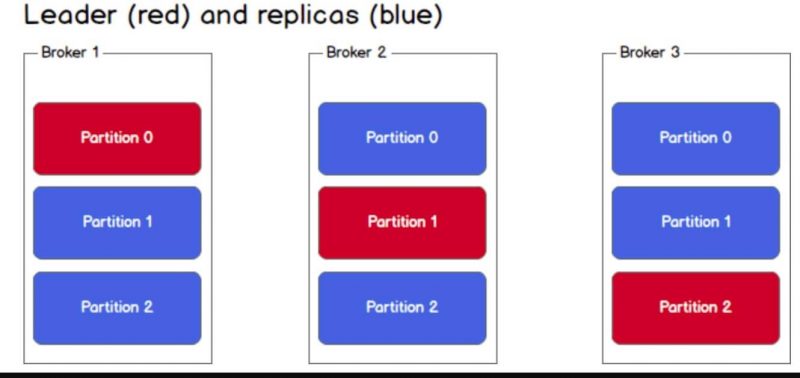
The mechanism here will be Leader - Follower (partitions). When data is pushed to the leader, it will be responsible for read/write operations. Followers only play the role of replication, we also cannot read from them because Kafka does not allow it. When the leader fails, a new leader will be elected from the followers and data will be synchronized.
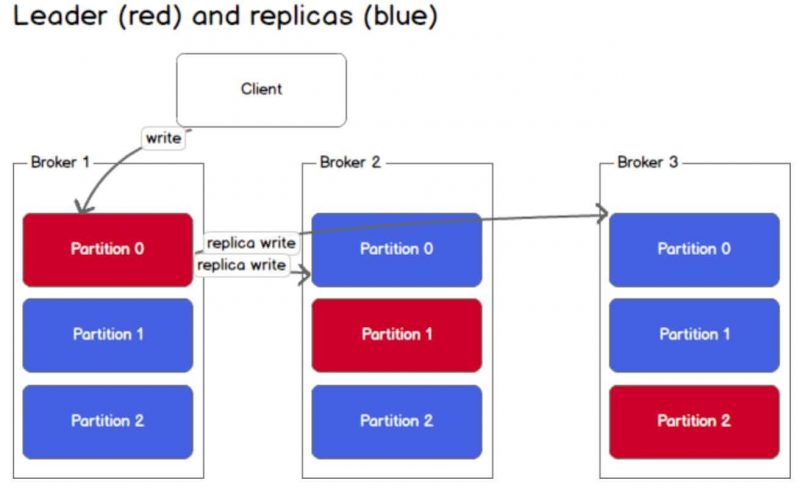
Leader - Follower storage will be stored in metadata managed by Zookeeper.
Producer
Producer is responsible for sending data to topics in brokers.
How Does a Producer Write a Message?
In a Kafka cluster, producers only write data to the partition leader of a topic. For a specific topic, we don’t mention leader - follower here, if there is new data coming in and the topic the producer sends to has more than 1 partition, only 1 partition will receive that data.
3 ways a producer can write to a topic:
send(key,value,topic,partition): explicitly specify the partition where the message is writtensend(key,value,topic): A hash function will calculate the key value to put into the appropriate partitionsend(key,value): Data is put into partitions using a round-robin mechanism
Consumer
Consumers retrieve data from topics in brokers that they subscribe to.
Consumers can read any offset in a topic, so they can join the cluster at any time.
How Does a Consumer Retrieve Messages?
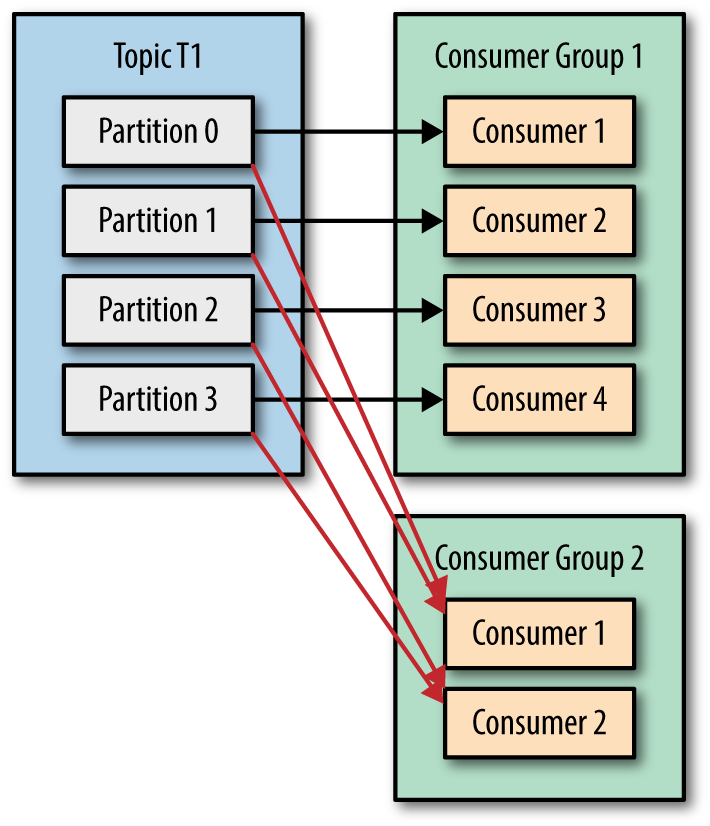
Like producers, consumers must first find metadata and read data from leader-partitions. If the data is large, consumers may lag -> to solve this, use Consumer Group.
Consumer group is a group of consumers with the same id. Each consumer will only be assigned to 1 partition. If the number of partitions is greater than the number of consumers, consumers can receive more, if smaller, some consumers will not receive data. Partition assignment to consumers will be handled by Group Coordinator - one of the brokers in the cluster
Data Storage in Kafka
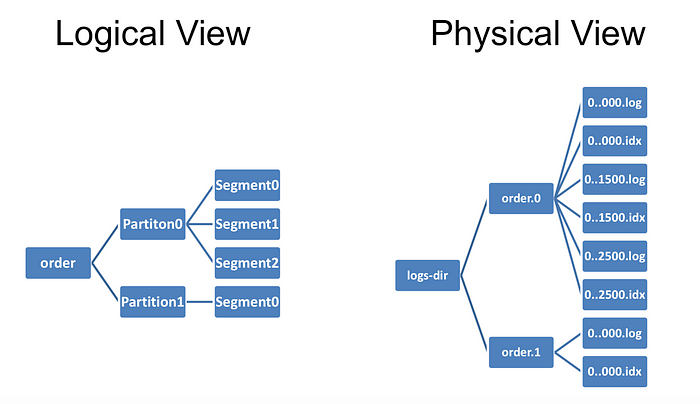
All data is stored on disk, not in RAM, and is arranged sequentially in a data structure called a log. This still allows Kafka to be fast for the following reasons:
- Messages are grouped together to form a segment -> reduces network resource usage costs, consumers will find a segment -> reduces disk load
- Data stored in binary format optimizes zero-copy capability
- Data at the producer has been compressed using compression algorithms like gzip and then decompressed at the consumer
- Reading/writing on log data structure is O(1) (No random disk access)
Use Cases
For e-commerce sites, each click or user action on that site can reflect their shopping habits. This data will be put into Kafka for real-time processing to provide suggestions right when they are on the website. Then stream processing will be aggregated with new data to provide suggestions for the next visit. Using Kafka will not be related to the system database, ensuring stability.
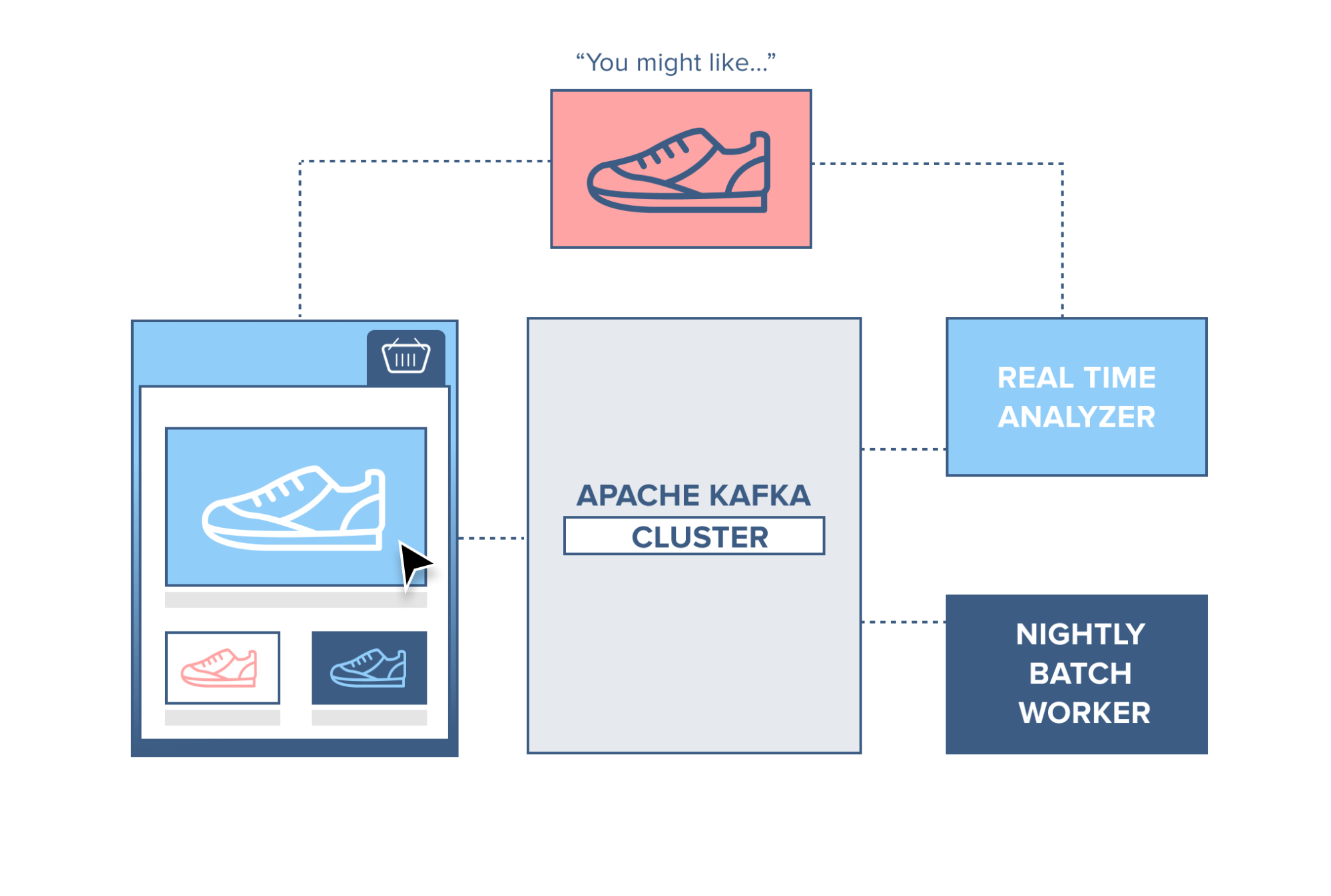
There are quite a few more applications but I don’t want to focus on this part, everyone can learn more.
Installing and Using Kafka
Installing Zookeeper
For quick deployment and easy use, I will use Docker. First, we will create a kafka folder and create a docker-compose file in it
1
2
mkdir kafka
cd kafka
First, we must have Zookeeper, in the docker-compose file I will configure as follows:
1
2
3
4
5
6
7
8
9
10
11
12
13
services:
  zookeeper:
    image: zookeeper:3.4.9
    hostname: zookeeper
    ports:
      - "2181:2181"
    environment:
      ZOO_MY_ID: 1
      ZOO_PORT: 2181
      ZOO_SERVERS: server.1=zookeeper:2888:3888
    volumes:
      - ./data/zookeeper/data:/data
      - ./data/zookeeper/datalog:/datalog
After finishing, run the docker-compose up command. The zookeeper container will be downloaded and we can run Zookeeper on port 2181 as configured.
Installing Kafka Standalone
I will temporarily stop the docker process running Zookeeper and continue editing in the docker-compose file with the following content:
1
2
3
4
5
6
7
8
9
10
11
12
13
14
15
16
kafka1:
    image: confluentinc/cp-kafka:5.3.0
    hostname: kafka1
    ports:
      - "9091:9091"
    environment:
      KAFKA_ADVERTISED_LISTENERS: LISTENER_DOCKER_INTERNAL://kafka1:19091,LISTENER_DOCKER_EXTERNAL://${DOCKER_HOST_IP:-127.0.0.1}:9091
      KAFKA_LISTENER_SECURITY_PROTOCOL_MAP: LISTENER_DOCKER_INTERNAL:PLAINTEXT,LISTENER_DOCKER_EXTERNAL:PLAINTEXT
      KAFKA_INTER_BROKER_LISTENER_NAME: LISTENER_DOCKER_INTERNAL
      KAFKA_ZOOKEEPER_CONNECT: "zookeeper:2181"
      KAFKA_BROKER_ID: 1
      KAFKA_OFFSETS_TOPIC_REPLICATION_FACTOR: 1
    volumes:
      - ./data/kafka1/data:/var/lib/kafka/data
    depends_on:
      - zookeeper
After editing, try running docker-compose up. I will try creating a topic with the command:
1
docker exec -it kafka_kafka1_1 kafka-topics --zookeeper zookeeper:2181 --create --topic my-topic --partitions 1 --replication-factor 1\n
Installing Kafka with Multiple Brokers
To run a Kafka cluster, I will need to add other brokers. Here we will add 2 more brokers by continuing to edit the docker-compose file.
Add broker 2 with id 2 on port 9089:
1
2
3
4
5
6
7
8
9
10
11
12
13
14
15
kafka2:
    image: confluentinc/cp-kafka:5.3.0
    hostname: kafka2
    ports:
      - "9089:9089"
    environment:
      KAFKA_ADVERTISED_LISTENERS: LISTENER_DOCKER_INTERNAL://kafka2:19092,LISTENER_DOCKER_EXTERNAL://${DOCKER_HOST_IP:-127.0.0.1}:9092
      KAFKA_LISTENER_SECURITY_PROTOCOL_MAP: LISTENER_DOCKER_INTERNAL:PLAINTEXT,LISTENER_DOCKER_EXTERNAL:PLAINTEXT
      KAFKA_INTER_BROKER_LISTENER_NAME: LISTENER_DOCKER_INTERNAL
      KAFKA_ZOOKEEPER_CONNECT: zookeeper:2181
      KAFKA_BROKER_ID: 2
    volumes:
      - ./data/kafka2/data:/var/lib/kafka/data
    depends_on:
      - zookeeper
Similarly for broker 3 on port 9090:
1
2
3
4
5
6
7
8
9
10
11
12
13
14
15
16
  kafka3:
    image: confluentinc/cp-kafka:5.3.0
    hostname: kafka3
    ports:
      - "9090:9090"
    environment:
      KAFKA_ADVERTISED_LISTENERS: LISTENER_DOCKER_INTERNAL://kafka3:19093,LISTENER_DOCKER_EXTERNAL://${DOCKER_HOST_IP:-127.0.0.1}:9093
      KAFKA_LISTENER_SECURITY_PROTOCOL_MAP: LISTENER_DOCKER_INTERNAL:PLAINTEXT,LISTENER_DOCKER_EXTERNAL:PLAINTEXT
      KAFKA_INTER_BROKER_LISTENER_NAME: LISTENER_DOCKER_INTERNAL
      KAFKA_ZOOKEEPER_CONNECT: "zookeeper:2181"
      KAFKA_BROKER_ID: 3
      KAFKA_OFFSETS_TOPIC_REPLICATION_FACTOR: 1
    volumes:
      - ./data/kafka3/data:/var/lib/kafka/data
    depends_on:
      - zookeeper
Now I will try to check if the cluster runs by creating a new topic with replication-factor = 3 (to see if the topic is distributed across all 3 brokers):
1
docker exec -it kafka_kafka1_1 kafka-topics --zookeeper zookeeper:2181 --create --topic my-topic-three --partitions 1 --replication-factor 3\n
References
A simple apache kafka cluster with docker kafdrop